Slides Deck Organization Guidelines for Presentations

Creating a compelling presentation requires more than beautiful visuals and engaging content. The foundation of any effective presentation lies in how well you organize your information, structure your narrative, and guide your audience through your message. Whether you're building a pitch deck for investors or preparing a quarterly business review, following proven slides deck organization guidelines ensures your presentation delivers maximum impact while maintaining clarity and professionalism throughout.

The Strategic Foundation of Deck Organization

Before diving into design elements or content creation, establishing a clear organizational framework sets the stage for presentation success. Strategic organization begins with understanding your audience's needs and mapping your content to meet those expectations systematically.

Defining Your Core Message Architecture

Every presentation needs a central thesis that guides all organizational decisions. Start by identifying the single most important message you want your audience to remember, then build your entire deck structure around reinforcing that core concept.

Your message architecture should include:

  • Primary objective: What action or decision you want from your audience
  • Supporting pillars: Three to five key points that validate your main message
  • Evidence hierarchy: How data, case studies, and testimonials flow through your narrative
  • Logical progression: The sequential path that moves audiences from awareness to action

This foundational work prevents the common pitfall of creating disjointed slides that fail to build momentum. When you establish clear organizational principles from the start, every subsequent decision about slide placement, content grouping, and visual emphasis becomes significantly easier.

Presentation message architecture framework

Audience-Centric Structure Planning

Different audiences require different organizational approaches. Financial stakeholders prioritize data validation and risk assessment, while creative teams may respond better to visual storytelling and conceptual frameworks. Understanding these preferences shapes how you sequence information throughout your deck.

Consider creating audience personas before finalizing your structure. Map out what information each stakeholder group values most, when they need to see it, and how deeply they want to explore each topic. This intelligence directly informs your slides deck organization guidelines implementation.

Essential Organizational Frameworks

Professional presentation designers rely on proven frameworks that consistently deliver results across industries and presentation types. These frameworks provide tested blueprints for organizing complex information into digestible, persuasive narratives.

The Pyramid Principle for Executive Decks

Barbara Minto's pyramid principle remains one of the most effective organizational methods for business presentations. This approach places your conclusion upfront, followed by supporting arguments arranged in logical groupings.

Framework Layer Purpose Typical Slide Count
Executive Summary Core message and recommendation 1-2 slides
Key Arguments Supporting reasons (grouped) 3-5 slides
Detailed Evidence Data, case studies, analysis 6-12 slides
Appendix Reference material, deep dives As needed

This structure respects executive time constraints while providing depth for those who want to dig deeper. When crafting professional PowerPoint presentations, this framework ensures busy decision-makers get your message immediately while having access to comprehensive backup.

Narrative Arc Organization

Story-based presentations benefit from classical narrative structures adapted for business contexts. The hero's journey, problem-solution-benefit, and before-after-bridge frameworks all provide compelling organizational templates.

Problem-Solution-Benefit Structure:

  1. Current state analysis (establishing the problem)
  2. Consequences of inaction (building urgency)
  3. Proposed solution (introducing your offering)
  4. Implementation roadmap (demonstrating feasibility)
  5. Expected outcomes (quantifying benefits)
  6. Call to action (securing commitment)

This sequence creates emotional engagement while maintaining logical flow. Tech startup pitch decks frequently leverage this structure because it aligns with how investors evaluate opportunities: understanding the problem, assessing the solution, and calculating potential returns.

Master File Organization and Navigation

Beyond content sequencing, proper file organization and navigation systems distinguish amateur presentations from professional deliverables. These technical aspects of slides deck organization guidelines often get overlooked despite their significant impact on presentation effectiveness.

Section-Based Architecture

Divide your presentation into distinct sections, each with a clear purpose and visual identity. This approach helps audiences understand where they are in your narrative while making it easier to navigate during live presentations or asynchronous review.

Implement section dividers that include:

  • Section title and description
  • Visual indicator of progress through the deck
  • Estimated time or slide count for the section
  • Thematic color or design element for quick recognition

Many presentation professionals use master slides to maintain consistency across section dividers. This technical organization ensures visual coherence even when multiple team members contribute content.

Logical Slide Sequencing

Each slide should flow naturally from the previous one while setting up the next. Test your sequence by reviewing slide titles in isolation-they should tell a coherent story without needing to see the full content.

Effective sequencing techniques include:

  • Build and reveal: Progressively add complexity rather than presenting all information at once
  • Compare and contrast: Place related concepts side-by-side for easy comparison
  • Zoom in/zoom out: Alternate between big-picture context and detailed analysis
  • Chronological progression: When appropriate, organize by timeline or process stages

According to research on creating effective slide decks, well-sequenced presentations reduce cognitive load and improve information retention by up to 40% compared to randomly ordered content.

Slide navigation system

Visual Hierarchy and Content Layout

Organizational excellence extends beyond slide order into how you arrange elements within individual slides. Visual hierarchy guides attention and reinforces your organizational structure through design choices.

The Z-Pattern and F-Pattern Layouts

Research on reading patterns reveals that audiences scan slides in predictable ways. Western audiences typically follow Z-patterns for slides with balanced content or F-patterns for text-heavy slides.

Organize slide elements to align with these natural eye movements:

  • Top-left: Most important information or key takeaway
  • Top-right: Supporting data or context
  • Center: Visual focal point (chart, image, or diagram)
  • Bottom: Call-to-action or transition statement

This scientifically-grounded approach to layout organization ensures your most critical messages receive attention first, regardless of presentation format.

Consistent Grid Systems

Professional designers use grid systems to maintain visual consistency across slides. Establishing a grid early in your design process creates organizational discipline that prevents layout chaos.

Grid Type Best For Columns
Single column Text-focused slides, quotes 1
Two-column Comparison slides, balanced content 2
Three-column Feature lists, process steps 3
Modular grid Complex data, dashboard layouts 12+

When working with design for PowerPoint, consistent grids enable rapid iteration while maintaining professional polish. They also facilitate collaboration by providing clear layout rules for all contributors.

Content Grouping Strategies

How you group related information significantly impacts comprehension and retention. Smart content organization transforms overwhelming data into accessible insights.

The Rule of Three

Cognitive psychology consistently demonstrates that people process information most effectively in groups of three. Apply this principle throughout your organizational strategy:

  • Three main sections in your deck
  • Three supporting points per major argument
  • Three data points per chart or visualization
  • Three takeaways in your conclusion

While not every slide needs exactly three elements, this guideline prevents information overload while creating memorable, digestible content structures.

Proximity and Chunking

Related elements should live close together both spatially and sequentially. This fundamental design principle, outlined in accessible slide deck guidelines, improves comprehension for all audiences.

Group content by:

  1. Topic affinity: All slides about market analysis together, all product features together
  2. Functional relationship: Charts and their corresponding interpretations on the same or consecutive slides
  3. Temporal sequence: Chronological processes grouped in order
  4. Conceptual similarity: Abstract ideas paired with concrete examples

This chunking approach reduces the mental effort required to understand relationships between different pieces of information, making your presentation easier to follow and more persuasive.

Technical File Management

Professional presentations require robust file management practices that prevent version confusion, enable collaboration, and ensure consistent delivery.

Naming Conventions and Version Control

Establish clear naming conventions before creating your first slide. A systematic approach prevents the chaos of multiple files named "Final_Deck_v3_FINAL_new.pptx."

Recommended naming structure:

[ClientName]_[ProjectType]_[Date]_[Version]_[Status].pptx

Example: Acme_InvestorPitch_2026-07-02_v4_Draft.pptx

This format instantly communicates essential file information without opening the document. Combine naming conventions with regular archiving of superseded versions to maintain a clean working environment.

Master Slides and Template Libraries

Creating and maintaining master slide templates represents a significant organizational investment that pays long-term dividends. Well-organized master slides ensure consistency while dramatically accelerating deck creation.

Build a comprehensive template library that includes:

  • Title slides with multiple layout options
  • Content slides for various content types (text, data, images)
  • Section dividers and transition slides
  • Chart and data visualization templates
  • Appendix and reference slide formats

When these templates follow your established slides deck organization guidelines, new presentations automatically inherit proper structure. Series B pitch decks often require multiple iterations-comprehensive templates make those revisions manageable.

Presentation template system

Data Visualization Organization

Financial and technical presentations often include substantial data-organizing these visualizations requires special attention to maintain clarity and impact.

Chart Sequencing Logic

Present data visualizations in logical sequences that build understanding progressively. Avoid jumping between different metrics, time periods, or data sets without clear transitions.

Effective data organization patterns:

  • Chronological: Show historical trends before projections
  • Hierarchical: Present high-level summaries before detailed breakdowns
  • Comparative: Group similar metrics together for easy comparison
  • Causal: Show leading indicators before resulting outcomes

Resources on creating standout slide decks emphasize that thoughtful data organization separates amateur presentations from professional ones. Your audience should never wonder why a particular chart appears when it does.

Supporting Material Placement

Determine what data requires main-deck placement versus appendix positioning. This decision directly impacts narrative flow and presentation length.

Placement Criteria Purpose
Main deck Directly supports key arguments Persuasion and decision-making
Appendix Provides validation or deep-dive Credibility and reference
Handout Supplementary context Additional resources

This organizational discipline keeps your main narrative focused while providing comprehensive backup for detailed questions. Fintech pitch presentations particularly benefit from this approach, as they balance compelling storytelling with rigorous financial analysis.

Collaborative Organization Systems

Modern presentations typically involve multiple contributors-establishing collaborative organization systems prevents chaos while maintaining quality.

Role-Based Section Ownership

Assign specific sections to individual team members based on expertise. This approach leverages specialized knowledge while creating clear accountability for content quality and deadlines.

Implement a section ownership matrix:

  • Executive Summary: Project lead
  • Market Analysis: Research team
  • Product Overview: Product management
  • Financial Projections: Finance team
  • Implementation Plan: Operations lead

Each owner ensures their section follows established slides deck organization guidelines while maintaining the overall narrative flow.

Review and Approval Workflows

Structured review processes prevent organizational degradation as multiple stakeholders provide input. Without clear workflows, presentations become disorganized collections of competing visions.

Essential workflow stages:

  1. Outline approval: Stakeholders agree on structure before content creation
  2. Content review: Subject matter experts validate accuracy and completeness
  3. Design review: Visual consistency and brand compliance check
  4. Executive review: Final message and impact assessment
  5. Technical review: File integrity, links, and multimedia functionality

Following guidance from presentation communication best practices, structured workflows maintain organizational integrity throughout collaborative creation processes.

Integration Points and Handoff Materials

Professional presentations rarely exist in isolation-they connect to broader business processes and communication ecosystems.

Connected Communication Tools

Modern business presentations often integrate with digital business card systems, CRM platforms, and follow-up communication tools. Organizing these integration points ensures smooth post-presentation workflows.

For example, incorporating digital business cards from Spreadly into your presentation workflow enables seamless contact sharing and lead capture during networking events or investor meetings. These tools complement your organized deck by facilitating the crucial connections that follow compelling presentations.

Integration considerations include:

  • QR codes linking to digital contact information
  • Embedded scheduling links for follow-up meetings
  • CRM tracking for presentation distribution and engagement
  • Analytics integration for measuring deck effectiveness

These connected systems transform your organized presentation from a static document into a dynamic business development tool.

Supporting Documentation Organization

Presentations rarely stand alone-they connect to proposals, detailed analyses, case studies, and other supporting materials. Organizing these complementary documents ensures smooth transitions between presentation and deeper engagement.

Create a standardized support package structure:

  1. Executive presentation (main deck)
  2. Detailed appendix (extended data and analysis)
  3. One-page summary (leave-behind document)
  4. FAQ document (common questions and responses)
  5. Case studies or references (validation materials)

This organizational approach, whether you're working with cybersecurity pitch decks or fintech presentations, ensures you have the right materials at the right depth for any audience or situation.

Maintenance and Version Lifecycle

Professional slides deck organization guidelines extend beyond initial creation into ongoing maintenance and version management.

Regular Audit Schedules

Presentations degrade over time as data becomes outdated, branding evolves, and strategic priorities shift. Establish regular audit schedules to maintain organizational excellence.

Quarterly review checklist:

  • Update all data points and statistics
  • Verify external links and references remain active
  • Refresh case studies and customer examples
  • Confirm brand compliance with current guidelines
  • Test all interactive elements and multimedia
  • Remove outdated content or deprecated messaging

These regular audits prevent the common scenario where important presentations contain obsolete information that undermines credibility.

Archival and Knowledge Management

As presentations evolve, maintaining historical versions provides valuable institutional knowledge while preventing version confusion.

Implement a structured archival system:

  • Active presentations: Current, approved versions for immediate use
  • Version archive: Superseded versions with clear date stamps
  • Template library: Reusable components and layouts
  • Reference repository: Successful presentations for inspiration and learning

This organizational infrastructure supports continuous improvement by enabling teams to learn from past successes while avoiding repeated mistakes.


Implementing comprehensive slides deck organization guidelines transforms presentation creation from chaotic scrambling into systematic excellence. By establishing clear structural frameworks, maintaining consistent visual hierarchies, and building robust file management systems, you create presentations that communicate with clarity and convert audiences into advocates. Whether you're preparing investor pitches, sales presentations, or executive briefings, Prznt Perfect brings specialized expertise in transforming complex information into compelling visual narratives that drive results for financial and technology businesses.

We offer free 30-min consultation on the presentation design audit
and hiring the right visual 
comms professional, let’s talk!
Shedule a call
Shedule a call
"I understand" goes a step further into the cognitive dance of persuasion. It's where the audience begins to see the connections between the facts, to grasp the nuances of the problem and the elegance of the solution.
  • This is some text inside of a div block.
    lay out the facts clearly and compellingly. Use data to establish the ground reality, but remember that facts alone are like the individual strands of a tapestry—necessary but not complete.
    lay out the facts clearly and compellingly. Use data to establish the ground reality, but remember that facts alone are like the individual strands of a tapestry—necessary but not complete.
  • This is some text inside of a div block.
    lay out the facts clearly and compellingly. Use data to establish the ground reality, but remember that facts alone are like the individual strands of a tapestry—necessary but not complete.

We offer free 30-min consultation on the presentation design audit

and hiring the right visual 
comms professional, let’s talk!

Shedule a call

"I understand" goes a step further into the cognitive dance of persuasion. It's where the audience begins to see the connections between the facts, to grasp the nuances of the problem and the elegance of the solution.

  • - 1 -
    Consistency at Scale:

    Biotech Market Trends 2024: Tailoring Your Pitch Deck to Current Industry Dynamics.

  • - 2 -
    Efficiency and Speed:

    The traditional process of manually updating presentations is not only slow but also prone to bottlenecks, especially when dealing with large volumes of slides. Automation dramatically accelerates this process, enabling designers to apply changes across hundreds of slides in the time it would take to manually update a single one. This efficiency is a game-changer for agencies working under tight deadlines or managing multiple projects simultaneously.

  • - 3 -
    Enhanced Creativity:

    With the burden of manual updates lifted, designers can allocate more time and energy to the creative aspects of presentation design. This freedom allows for deeper exploration of innovative design concepts, experimentation with new visual storytelling techniques, and the development of more engaging and interactive presentations. Automation doesn't stifle creativity; it amplifies it, enabling designers to push the boundaries of what's possible in corporate presentation design.

  • - 4 -
    Error Reduction:

    Manual updates are inherently prone to inconsistencies and mistakes, from misaligned logos to incorrect font sizes. These errors can detract from the professionalism of a presentation and, by extension, the corporate image. Automation minimizes these risks by ensuring that updates are applied uniformly and accurately across all slides, enhancing the overall quality and integrity of the presentation.

  • - 5 -
    Cost-Effectiveness:

    The time savings afforded by automation directly translate to cost savings for both the design agency and its clients. By reducing the hours spent on manual updates, agencies can optimize their workflows and resources, allowing them to take on more projects without compromising on quality. This efficiency can also make high-quality presentation design services more affordable and accessible to a broader range of businesses.

Slides Deck Organization Guidelines for Presentations
Master slides deck organization guidelines to create professional presentations. Learn structure, navigation, and design best practices.

Creating a compelling presentation requires more than beautiful visuals and engaging content. The foundation of any effective presentation lies in how well you organize your information, structure your narrative, and guide your audience through your message. Whether you're building a pitch deck for investors or preparing a quarterly business review, following proven slides deck organization guidelines ensures your presentation delivers maximum impact while maintaining clarity and professionalism throughout.

The Strategic Foundation of Deck Organization

Before diving into design elements or content creation, establishing a clear organizational framework sets the stage for presentation success. Strategic organization begins with understanding your audience's needs and mapping your content to meet those expectations systematically.

Defining Your Core Message Architecture

Every presentation needs a central thesis that guides all organizational decisions. Start by identifying the single most important message you want your audience to remember, then build your entire deck structure around reinforcing that core concept.

Your message architecture should include:

  • Primary objective: What action or decision you want from your audience
  • Supporting pillars: Three to five key points that validate your main message
  • Evidence hierarchy: How data, case studies, and testimonials flow through your narrative
  • Logical progression: The sequential path that moves audiences from awareness to action

This foundational work prevents the common pitfall of creating disjointed slides that fail to build momentum. When you establish clear organizational principles from the start, every subsequent decision about slide placement, content grouping, and visual emphasis becomes significantly easier.

Presentation message architecture framework

Audience-Centric Structure Planning

Different audiences require different organizational approaches. Financial stakeholders prioritize data validation and risk assessment, while creative teams may respond better to visual storytelling and conceptual frameworks. Understanding these preferences shapes how you sequence information throughout your deck.

Consider creating audience personas before finalizing your structure. Map out what information each stakeholder group values most, when they need to see it, and how deeply they want to explore each topic. This intelligence directly informs your slides deck organization guidelines implementation.

Essential Organizational Frameworks

Professional presentation designers rely on proven frameworks that consistently deliver results across industries and presentation types. These frameworks provide tested blueprints for organizing complex information into digestible, persuasive narratives.

The Pyramid Principle for Executive Decks

Barbara Minto's pyramid principle remains one of the most effective organizational methods for business presentations. This approach places your conclusion upfront, followed by supporting arguments arranged in logical groupings.

Framework Layer Purpose Typical Slide Count
Executive Summary Core message and recommendation 1-2 slides
Key Arguments Supporting reasons (grouped) 3-5 slides
Detailed Evidence Data, case studies, analysis 6-12 slides
Appendix Reference material, deep dives As needed

This structure respects executive time constraints while providing depth for those who want to dig deeper. When crafting professional PowerPoint presentations, this framework ensures busy decision-makers get your message immediately while having access to comprehensive backup.

Narrative Arc Organization

Story-based presentations benefit from classical narrative structures adapted for business contexts. The hero's journey, problem-solution-benefit, and before-after-bridge frameworks all provide compelling organizational templates.

Problem-Solution-Benefit Structure:

  1. Current state analysis (establishing the problem)
  2. Consequences of inaction (building urgency)
  3. Proposed solution (introducing your offering)
  4. Implementation roadmap (demonstrating feasibility)
  5. Expected outcomes (quantifying benefits)
  6. Call to action (securing commitment)

This sequence creates emotional engagement while maintaining logical flow. Tech startup pitch decks frequently leverage this structure because it aligns with how investors evaluate opportunities: understanding the problem, assessing the solution, and calculating potential returns.

Master File Organization and Navigation

Beyond content sequencing, proper file organization and navigation systems distinguish amateur presentations from professional deliverables. These technical aspects of slides deck organization guidelines often get overlooked despite their significant impact on presentation effectiveness.

Section-Based Architecture

Divide your presentation into distinct sections, each with a clear purpose and visual identity. This approach helps audiences understand where they are in your narrative while making it easier to navigate during live presentations or asynchronous review.

Implement section dividers that include:

  • Section title and description
  • Visual indicator of progress through the deck
  • Estimated time or slide count for the section
  • Thematic color or design element for quick recognition

Many presentation professionals use master slides to maintain consistency across section dividers. This technical organization ensures visual coherence even when multiple team members contribute content.

Logical Slide Sequencing

Each slide should flow naturally from the previous one while setting up the next. Test your sequence by reviewing slide titles in isolation-they should tell a coherent story without needing to see the full content.

Effective sequencing techniques include:

  • Build and reveal: Progressively add complexity rather than presenting all information at once
  • Compare and contrast: Place related concepts side-by-side for easy comparison
  • Zoom in/zoom out: Alternate between big-picture context and detailed analysis
  • Chronological progression: When appropriate, organize by timeline or process stages

According to research on creating effective slide decks, well-sequenced presentations reduce cognitive load and improve information retention by up to 40% compared to randomly ordered content.

Slide navigation system

Visual Hierarchy and Content Layout

Organizational excellence extends beyond slide order into how you arrange elements within individual slides. Visual hierarchy guides attention and reinforces your organizational structure through design choices.

The Z-Pattern and F-Pattern Layouts

Research on reading patterns reveals that audiences scan slides in predictable ways. Western audiences typically follow Z-patterns for slides with balanced content or F-patterns for text-heavy slides.

Organize slide elements to align with these natural eye movements:

  • Top-left: Most important information or key takeaway
  • Top-right: Supporting data or context
  • Center: Visual focal point (chart, image, or diagram)
  • Bottom: Call-to-action or transition statement

This scientifically-grounded approach to layout organization ensures your most critical messages receive attention first, regardless of presentation format.

Consistent Grid Systems

Professional designers use grid systems to maintain visual consistency across slides. Establishing a grid early in your design process creates organizational discipline that prevents layout chaos.

Grid Type Best For Columns
Single column Text-focused slides, quotes 1
Two-column Comparison slides, balanced content 2
Three-column Feature lists, process steps 3
Modular grid Complex data, dashboard layouts 12+

When working with design for PowerPoint, consistent grids enable rapid iteration while maintaining professional polish. They also facilitate collaboration by providing clear layout rules for all contributors.

Content Grouping Strategies

How you group related information significantly impacts comprehension and retention. Smart content organization transforms overwhelming data into accessible insights.

The Rule of Three

Cognitive psychology consistently demonstrates that people process information most effectively in groups of three. Apply this principle throughout your organizational strategy:

  • Three main sections in your deck
  • Three supporting points per major argument
  • Three data points per chart or visualization
  • Three takeaways in your conclusion

While not every slide needs exactly three elements, this guideline prevents information overload while creating memorable, digestible content structures.

Proximity and Chunking

Related elements should live close together both spatially and sequentially. This fundamental design principle, outlined in accessible slide deck guidelines, improves comprehension for all audiences.

Group content by:

  1. Topic affinity: All slides about market analysis together, all product features together
  2. Functional relationship: Charts and their corresponding interpretations on the same or consecutive slides
  3. Temporal sequence: Chronological processes grouped in order
  4. Conceptual similarity: Abstract ideas paired with concrete examples

This chunking approach reduces the mental effort required to understand relationships between different pieces of information, making your presentation easier to follow and more persuasive.

Technical File Management

Professional presentations require robust file management practices that prevent version confusion, enable collaboration, and ensure consistent delivery.

Naming Conventions and Version Control

Establish clear naming conventions before creating your first slide. A systematic approach prevents the chaos of multiple files named "Final_Deck_v3_FINAL_new.pptx."

Recommended naming structure:

[ClientName]_[ProjectType]_[Date]_[Version]_[Status].pptx

Example: Acme_InvestorPitch_2026-07-02_v4_Draft.pptx

This format instantly communicates essential file information without opening the document. Combine naming conventions with regular archiving of superseded versions to maintain a clean working environment.

Master Slides and Template Libraries

Creating and maintaining master slide templates represents a significant organizational investment that pays long-term dividends. Well-organized master slides ensure consistency while dramatically accelerating deck creation.

Build a comprehensive template library that includes:

  • Title slides with multiple layout options
  • Content slides for various content types (text, data, images)
  • Section dividers and transition slides
  • Chart and data visualization templates
  • Appendix and reference slide formats

When these templates follow your established slides deck organization guidelines, new presentations automatically inherit proper structure. Series B pitch decks often require multiple iterations-comprehensive templates make those revisions manageable.
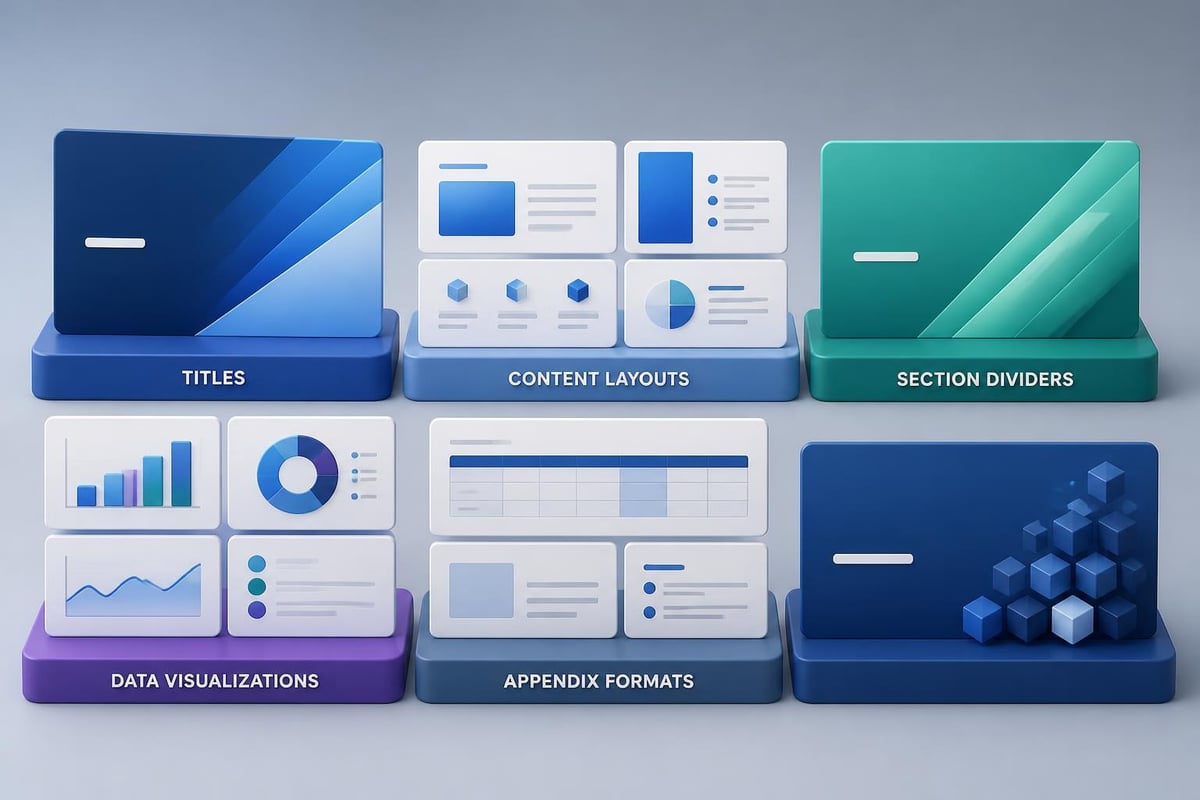
Presentation template system

Data Visualization Organization

Financial and technical presentations often include substantial data-organizing these visualizations requires special attention to maintain clarity and impact.

Chart Sequencing Logic

Present data visualizations in logical sequences that build understanding progressively. Avoid jumping between different metrics, time periods, or data sets without clear transitions.

Effective data organization patterns:

  • Chronological: Show historical trends before projections
  • Hierarchical: Present high-level summaries before detailed breakdowns
  • Comparative: Group similar metrics together for easy comparison
  • Causal: Show leading indicators before resulting outcomes

Resources on creating standout slide decks emphasize that thoughtful data organization separates amateur presentations from professional ones. Your audience should never wonder why a particular chart appears when it does.

Supporting Material Placement

Determine what data requires main-deck placement versus appendix positioning. This decision directly impacts narrative flow and presentation length.

Placement Criteria Purpose
Main deck Directly supports key arguments Persuasion and decision-making
Appendix Provides validation or deep-dive Credibility and reference
Handout Supplementary context Additional resources

This organizational discipline keeps your main narrative focused while providing comprehensive backup for detailed questions. Fintech pitch presentations particularly benefit from this approach, as they balance compelling storytelling with rigorous financial analysis.

Collaborative Organization Systems

Modern presentations typically involve multiple contributors-establishing collaborative organization systems prevents chaos while maintaining quality.

Role-Based Section Ownership

Assign specific sections to individual team members based on expertise. This approach leverages specialized knowledge while creating clear accountability for content quality and deadlines.

Implement a section ownership matrix:

  • Executive Summary: Project lead
  • Market Analysis: Research team
  • Product Overview: Product management
  • Financial Projections: Finance team
  • Implementation Plan: Operations lead

Each owner ensures their section follows established slides deck organization guidelines while maintaining the overall narrative flow.

Review and Approval Workflows

Structured review processes prevent organizational degradation as multiple stakeholders provide input. Without clear workflows, presentations become disorganized collections of competing visions.

Essential workflow stages:

  1. Outline approval: Stakeholders agree on structure before content creation
  2. Content review: Subject matter experts validate accuracy and completeness
  3. Design review: Visual consistency and brand compliance check
  4. Executive review: Final message and impact assessment
  5. Technical review: File integrity, links, and multimedia functionality

Following guidance from presentation communication best practices, structured workflows maintain organizational integrity throughout collaborative creation processes.

Integration Points and Handoff Materials

Professional presentations rarely exist in isolation-they connect to broader business processes and communication ecosystems.

Connected Communication Tools

Modern business presentations often integrate with digital business card systems, CRM platforms, and follow-up communication tools. Organizing these integration points ensures smooth post-presentation workflows.

For example, incorporating digital business cards from Spreadly into your presentation workflow enables seamless contact sharing and lead capture during networking events or investor meetings. These tools complement your organized deck by facilitating the crucial connections that follow compelling presentations.

Integration considerations include:

  • QR codes linking to digital contact information
  • Embedded scheduling links for follow-up meetings
  • CRM tracking for presentation distribution and engagement
  • Analytics integration for measuring deck effectiveness

These connected systems transform your organized presentation from a static document into a dynamic business development tool.

Supporting Documentation Organization

Presentations rarely stand alone-they connect to proposals, detailed analyses, case studies, and other supporting materials. Organizing these complementary documents ensures smooth transitions between presentation and deeper engagement.

Create a standardized support package structure:

  1. Executive presentation (main deck)
  2. Detailed appendix (extended data and analysis)
  3. One-page summary (leave-behind document)
  4. FAQ document (common questions and responses)
  5. Case studies or references (validation materials)

This organizational approach, whether you're working with cybersecurity pitch decks or fintech presentations, ensures you have the right materials at the right depth for any audience or situation.

Maintenance and Version Lifecycle

Professional slides deck organization guidelines extend beyond initial creation into ongoing maintenance and version management.

Regular Audit Schedules

Presentations degrade over time as data becomes outdated, branding evolves, and strategic priorities shift. Establish regular audit schedules to maintain organizational excellence.

Quarterly review checklist:

  • Update all data points and statistics
  • Verify external links and references remain active
  • Refresh case studies and customer examples
  • Confirm brand compliance with current guidelines
  • Test all interactive elements and multimedia
  • Remove outdated content or deprecated messaging

These regular audits prevent the common scenario where important presentations contain obsolete information that undermines credibility.

Archival and Knowledge Management

As presentations evolve, maintaining historical versions provides valuable institutional knowledge while preventing version confusion.

Implement a structured archival system:

  • Active presentations: Current, approved versions for immediate use
  • Version archive: Superseded versions with clear date stamps
  • Template library: Reusable components and layouts
  • Reference repository: Successful presentations for inspiration and learning

This organizational infrastructure supports continuous improvement by enabling teams to learn from past successes while avoiding repeated mistakes.


Implementing comprehensive slides deck organization guidelines transforms presentation creation from chaotic scrambling into systematic excellence. By establishing clear structural frameworks, maintaining consistent visual hierarchies, and building robust file management systems, you create presentations that communicate with clarity and convert audiences into advocates. Whether you're preparing investor pitches, sales presentations, or executive briefings, Prznt Perfect brings specialized expertise in transforming complex information into compelling visual narratives that drive results for financial and technology businesses.

News & Updates...

Master the biotech partnership deck with expert strategies for structuring, designing, and delivering presentations that secure strategic collaborations.

Discover which companies hire art directors in 2026. Explore top industries, hiring trends, and what leading employers seek in creative leadership.