
Presentation 3D: Transform Your Business Visuals
The landscape of business presentations has undergone a dramatic transformation in 2026, with three-dimensional visualization becoming a critical differentiator for companies seeking to capture attention and convey complex information. Presentation 3D technology represents more than just visual enhancement; it's a fundamental shift in how organizations communicate value propositions, financial data, and technical concepts to stakeholders, investors, and clients. As audiences become increasingly sophisticated and attention spans continue to shrink, the ability to leverage spatial depth, interactive elements, and immersive experiences separates memorable presentations from forgettable ones.
Understanding the Power of Three-Dimensional Presentation Design
Three-dimensional presentation design fundamentally changes how information flows from presenter to audience. Unlike traditional flat slides, presentation 3D creates depth perception that mirrors how humans naturally process visual information in the real world.
Financial firms leverage this technology to:
- Visualize complex portfolio structures with layered depth
- Display market trends across multiple time dimensions
- Represent risk assessments through spatial relationships
- Showcase growth trajectories with dynamic 3D charts
The cognitive impact of spatial design cannot be overstated. When data points exist in three-dimensional space rather than confined to two axes, viewers process relationships between variables more intuitively. This becomes particularly valuable when presenting company information that involves multiple interconnected datasets.

Technical Foundations That Enable 3D Presentations
Several technical approaches power modern presentation 3D implementations. Software tools range from integrated PowerPoint features to specialized platforms designed for immersive experiences.
PowerPoint's native 3D model support allows designers to import CAD files, manipulate objects in three-dimensional space, and create smooth transitions that rotate or zoom through complex structures. This accessibility democratizes 3D design for business users without requiring advanced modeling skills.
For more sophisticated needs, platforms like Impressive software deliver presentation slides with enhanced 3D effects that transform static content into dynamic visual journeys. These tools particularly excel when showcasing technical products or architectural concepts.
| Presentation 3D Approach | Best Use Case | Technical Requirement | Learning Curve |
|---|---|---|---|
| PowerPoint 3D Models | Product demonstrations | Microsoft 365 | Low |
| Specialized 3D Software | Complex data visualization | Dedicated applications | Medium |
| Interactive 3D Platforms | Client engagement | Web-based frameworks | Medium-High |
| CAD Integration | Technical specifications | OpenSCAD or similar | High |
Creating Compelling Visual Narratives with Spatial Design
The strategic implementation of presentation 3D requires understanding how spatial elements guide viewer attention and reinforce messaging hierarchies. Professional designers craft experiences where depth, perspective, and movement work in concert to tell cohesive stories.
Layering Information for Maximum Impact
Three-dimensional space allows information architecture that would overwhelm a flat slide. Consider a tech startup pitch deck showcasing its platform architecture. Instead of cramming components onto a single slide, presentation 3D enables:
- Front layer: User interface and customer touchpoints
- Middle layer: Application logic and business processes
- Back layer: Infrastructure and data management
- Connections: Dynamic lines showing data flow between layers
This approach transforms abstract concepts into tangible structures. When designing presentation cover slides, incorporating subtle 3D elements immediately signals sophistication and modernity to viewers.
The financial sector benefits tremendously from layered visualization. Investment presentations can display market sectors as three-dimensional blocks, with size representing market cap and position indicating correlation coefficients. This single visualization communicates relationships that would require multiple traditional charts.
Movement and Transition Strategies
Static 3D objects offer limited advantage over well-designed 2D graphics. The true power emerges through strategic animation and camera movements that guide audience focus through complex information landscapes.
Effective presentation 3D transitions include:
- Rotating product models to reveal features from multiple angles
- Zooming through organizational hierarchies
- Peeling back layers to expose underlying processes
- Flying through timeline visualizations
Professional presentation designers avoid gratuitous animation. Every movement should serve a narrative purpose, whether revealing new information, emphasizing relationships, or transitioning between topics. The layout considerations for presentations remain foundational even when working in three dimensions.
Industry-Specific Applications of 3D Presentation Technology
Different sectors leverage presentation 3D in ways tailored to their unique communication challenges and audience expectations. Understanding these applications provides insight into strategic implementation.
Financial Services and Investment Communications
Financial presentations in 2026 increasingly incorporate three-dimensional data visualization to clarify complex investment structures and performance metrics. Portfolio managers use spatial representations where individual holdings occupy positions based on risk-return profiles, creating intuitive visual clustering.
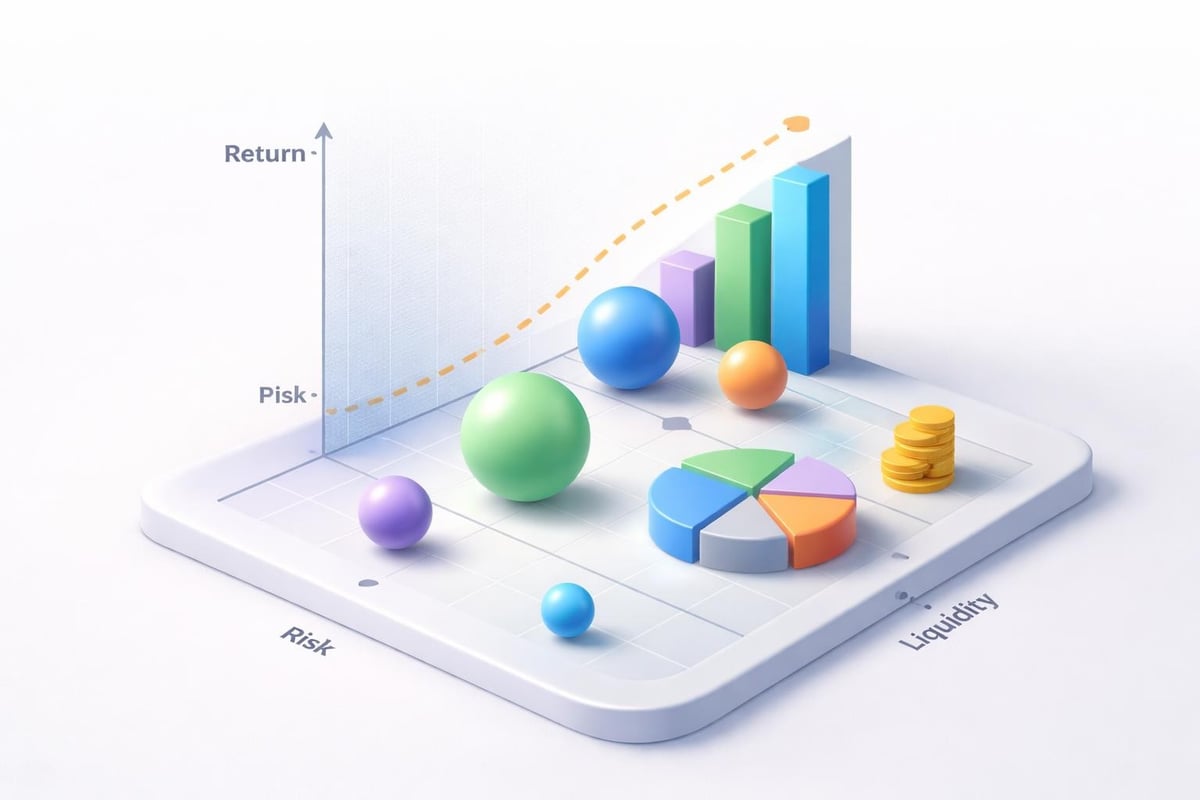
Risk assessment presentations benefit particularly from 3D scatter plots where:
- X-axis represents expected return
- Y-axis shows volatility metrics
- Z-axis indicates liquidity factors
- Sphere size communicates position size
This multidimensional approach enables sophisticated investors to grasp portfolio composition at a glance. When combined with interactive elements through platforms like JigSpace, viewers can rotate perspectives and drill into specific holdings for detailed analysis.
Technology Product Demonstrations
Tech companies face the perpetual challenge of explaining abstract software architecture and complex feature sets to non-technical stakeholders. Presentation 3D solves this by making the invisible visible through spatial metaphors.
Cloud infrastructure presentations exemplify this application. Rather than showing flat network diagrams, designers create:
| Infrastructure Component | 3D Representation | Viewer Benefit |
|---|---|---|
| Server clusters | Grouped geometric shapes | Visual capacity understanding |
| Data flow | Animated particle streams | Process comprehension |
| Security layers | Transparent shields | Protection visualization |
| Geographic distribution | Globe-based mapping | Scale recognition |
This transformation proves particularly valuable in tech company presentations where conveying technical sophistication while maintaining accessibility determines funding success or client acquisition.
Architectural and Real Estate Visualization
Architecture firms pioneered many presentation 3D techniques now adopted across industries. The ability to walk through unbuilt spaces revolutionized client presentations and stakeholder approvals.
Modern architectural presentations extend beyond simple building walkthroughs. Advanced techniques for incorporating 3D elements enable designers to display contextual information, environmental impact analysis, and usage simulations within the same spatial environment where the building exists.
Real estate development presentations layer financial projections directly onto 3D building models, connecting investment numbers with physical spaces. Investors see revenue per floor, occupancy rates by wing, and construction costs mapped to actual building elements.
Design Principles for Professional 3D Presentations
Creating effective presentation 3D content requires balancing visual impact with clarity, sophistication with accessibility, and innovation with professionalism.
Color and Depth Perception Management
Three-dimensional space introduces new considerations for color selection. Designers must account for how colors interact across depth planes and how lighting affects perception of spatial relationships.
Professional color strategies include:
- Using cooler tones for background elements to create recession
- Applying warmer colors to foreground objects for emphasis
- Implementing consistent lighting models across all 3D elements
- Maintaining brand color integrity despite spatial complexity
The principles that govern attractive PowerPoint templates amplify in three-dimensional environments. Color choices that work adequately in flat design may create visual confusion when objects overlap in z-space.
Typography in Three-Dimensional Environments
Text integration presents unique challenges in presentation 3D designs. Labels, callouts, and explanatory text must remain readable regardless of viewing angle while complementing rather than cluttering spatial compositions.
- Billboarding: Keep text elements perpendicular to camera view
- Proximity: Position labels close to referenced objects
- Contrast: Ensure text stands out against 3D backgrounds
- Scale: Adjust font sizes based on spatial depth
- Grouping: Cluster related labels to reduce visual noise
Professional designers often create depth hierarchy where primary messages occupy foreground space with larger typography, while supporting details recede spatially with appropriately scaled text.
Balancing Realism and Abstraction
A common pitfall in presentation 3D involves excessive realism that distracts from core messages. Photo-realistic rendering may impress initially but often obscures data relationships and slows comprehension.
Strategic abstraction maintains visual interest while prioritizing clarity. Financial data rarely requires textured surfaces and complex lighting. Instead, clean geometric forms with strategic color coding communicate more effectively.
Tools like Wings 3D enable designers to create precisely the level of detail appropriate for each presentation context. Tech presentations might employ semi-realistic interface mockups, while financial decks benefit from abstract geometric representations.

Implementation Workflows for Business Presentations
Integrating presentation 3D into corporate communication workflows requires structured processes that maintain quality while meeting tight deadlines characteristic of business environments.
Asset Creation and Management
Successful 3D presentation projects begin with organized asset libraries. Companies building recurring presentation needs should establish repositories of commonly used 3D elements.
Essential asset categories include:
- Branded geometric shapes and frames
- Industry-specific icons in 3D form
- Product models at various detail levels
- Template spatial layouts
- Pre-animated transition sequences
Using tools like Shapr3D on iPad enables rapid creation and iteration of custom 3D elements without requiring full workstation setups. This accessibility allows presentation teams to quickly adapt visuals to specific client needs or emerging data.
When working with presentation templates, incorporating 3D-ready slides accelerates production timelines. Teams can focus creative energy on customizing content rather than building spatial frameworks from scratch.
Testing Across Display Environments
Presentation 3D content must perform flawlessly across various display contexts. A visualization that appears stunning on a designer's 4K monitor may fail on conference room projectors or client laptops.
| Display Environment | Key Consideration | Testing Priority |
|---|---|---|
| Large projection screens | Viewing angle variation | High |
| Laptop displays | Detail visibility | Medium |
| Video conferencing | Compression artifacts | High |
| Mobile devices | Performance constraints | Medium |
| Print handouts | Static capture quality | Low |
Professional agencies incorporate multi-environment testing into standard workflows. The same presentation may require subtle adjustments in 3D element complexity, animation speed, or contrast levels depending on expected viewing conditions.
Measuring Impact and Effectiveness
Implementing presentation 3D represents an investment in communication infrastructure. Organizations should track metrics that demonstrate return on this investment and guide future design decisions.
Audience Engagement Indicators
Modern presentation platforms provide analytics that reveal how audiences interact with content. Three-dimensional elements typically show distinct engagement patterns compared to traditional slides.
Trackable engagement metrics include:
- Time spent on interactive 3D slides versus static content
- Click-through rates on explorable 3D models
- Completion rates for presentations containing 3D elements
- Post-presentation recall testing results
Financial firms presenting to institutional investors can correlate presentation styles with funding outcomes. Tech companies track how 3D product demonstrations influence conversion rates in sales presentations.
Comparative Performance Analysis
Organizations should conduct A/B testing comparing presentation 3D approaches against traditional formats for similar content. This evidence-based approach reveals which information types benefit most from spatial visualization.
One fintech company tested identical financial data presented through standard bar charts versus 3D volumetric representations. The three-dimensional approach showed 34% higher information retention in post-presentation assessments and 28% shorter average question-and-answer sessions, indicating improved initial comprehension.
Advanced Techniques for Competitive Differentiation
As presentation 3D becomes more prevalent, organizations seeking competitive advantage must explore sophisticated applications that extend beyond basic spatial visualization.
Real-Time Data Integration
Static 3D visualizations offer one level of impact. Dynamic presentations that pull live data into three-dimensional representations create entirely new engagement paradigms.
Financial dashboards can display real-time portfolio performance as an evolving 3D landscape where sectors rise and fall based on current market data. Tech companies demonstrate platform performance through live 3D visualizations of user activity, server loads, and transaction volumes.
Platforms supporting interactive 3D presentation creation enable these advanced implementations without requiring custom software development. The ability to connect presentation layers to data APIs transforms presentations from static communication tools into dynamic exploration environments.
Collaborative 3D Presentation Experiences
Remote work in 2026 demands presentation approaches that engage distributed audiences as effectively as in-person gatherings. Three-dimensional content enables new forms of collaborative exploration.
Virtual presentation environments allow multiple stakeholders to simultaneously navigate 3D data landscapes, each controlling their perspective while sharing a common spatial framework. Investment committees can collectively explore risk scenarios from different analytical angles during the same presentation session.
This collaborative dimension proves particularly valuable for cybersecurity presentations where technical and business stakeholders need to understand threat landscapes from their respective viewpoints.
Hybrid Physical-Digital Integration
Cutting-edge presentation strategies combine physical presence with digital 3D augmentation. Presenters use tablets to manipulate projected 3D content, creating tactile interaction with spatial visualizations.
Hybrid integration approaches include:
- Gesture-controlled 3D model manipulation
- Physical product samples paired with exploded digital views
- Augmented reality overlays on printed materials
- Synchronized multi-screen spatial narratives
These techniques position organizations at the innovation frontier, signaling technical sophistication while delivering genuinely enhanced comprehension.
Future Trajectory of Three-Dimensional Business Communication
The evolution of presentation 3D continues accelerating as hardware capabilities expand and software tools become more sophisticated and accessible. Organizations investing in these capabilities position themselves advantageously for emerging communication paradigms.
Artificial intelligence integration will soon enable automatic conversion of spreadsheet data into optimized 3D visualizations, selecting appropriate spatial representations based on data characteristics and presentation objectives. Natural language processing will allow presenters to manipulate 3D content through voice commands during live delivery.
The convergence of presentation design with extended reality technologies will blur boundaries between traditional presentations and immersive experiences. Financial advisors may soon guide clients through virtual portfolio environments. Tech companies will demonstrate software through explorable 3D interfaces rather than static screenshots.
Browser-based 3D rendering engines like Xeokit eliminate installation barriers, making sophisticated spatial visualizations as accessible as loading a webpage. This democratization ensures presentation 3D becomes standard practice rather than specialized capability.
Organizations partnering with professional agencies gain advantage through expertise in rapidly evolving tools and techniques. The services offered by specialized firms increasingly include 3D visualization strategy, spatial storytelling frameworks, and interactive experience design alongside traditional presentation development.
Mastering presentation 3D techniques provides organizations with powerful tools for communicating complex information, engaging sophisticated audiences, and differentiating their visual communications in competitive markets. The strategic implementation of three-dimensional visualization, grounded in solid design principles and aligned with business objectives, transforms presentations from information delivery vehicles into memorable experiences that drive decision-making and action. If you're ready to elevate your business presentations with cutting-edge 3D visualization and professional design expertise, Prznt Perfect specializes in creating visually stunning presentations that transform complex data into compelling narratives for financial and tech audiences.


- This is some text inside of a div block.lay out the facts clearly and compellingly. Use data to establish the ground reality, but remember that facts alone are like the individual strands of a tapestry—necessary but not complete.lay out the facts clearly and compellingly. Use data to establish the ground reality, but remember that facts alone are like the individual strands of a tapestry—necessary but not complete.
- This is some text inside of a div block.lay out the facts clearly and compellingly. Use data to establish the ground reality, but remember that facts alone are like the individual strands of a tapestry—necessary but not complete.

.png)
