
Website to Make Presentations: Top Tools for 2026

Creating compelling presentations has evolved dramatically from the days of desktop software installations and static slide decks. Today's professionals seek a website to make presentations that delivers flexibility, collaboration features, and professional design capabilities without the complexity of traditional tools. As financial and tech businesses demand more sophisticated visual storytelling, understanding which online platforms deliver results becomes critical for maintaining competitive advantage and communicating complex ideas effectively.
Understanding Modern Presentation Platforms
The landscape of online presentation creation has transformed significantly over the past few years. Modern platforms go beyond simple slide arrangements, offering sophisticated design systems, real-time collaboration, and intelligent automation features that streamline the entire creation process.
When evaluating a website to make presentations, consider how each platform addresses your specific business needs. Financial services firms require precise data visualization and compliance-friendly templates, while tech startups need flexible design systems that can adapt to rapidly changing messaging and brand evolution.
Key Features That Define Professional Tools
Essential capabilities separate amateur platforms from professional-grade solutions:
- Cloud-based accessibility across devices and operating systems
- Real-time collaboration with version control and commenting
- Template libraries optimized for business communications
- Data visualization tools for charts, graphs, and infographics
- Brand management features including custom fonts and color palettes
- Export options for multiple formats and presentation contexts
The best website to make presentations integrates seamlessly with existing workflows. Compatibility with design assets, corporate brand guidelines, and team collaboration tools determines whether a platform enhances or disrupts productivity.

Leading Platforms for Business Presentations
Different tools excel in different contexts. Understanding the strengths and limitations of each platform helps you select the right solution for your specific presentation requirements.
Google Slides: Collaboration-First Approach
Google Slides dominates the collaborative presentation space with its seamless integration into the Google Workspace ecosystem. The platform emphasizes real-time teamwork, allowing multiple stakeholders to review, comment, and edit simultaneously.
Advantages for business users:
- Zero installation requirements with browser-based access
- Automatic saving prevents data loss during creation
- Commenting system facilitates feedback loops
- Version history tracks changes and enables rollbacks
- Free tier includes robust functionality
However, Google Slides limitations become apparent when creating sophisticated financial presentations. The template library lacks depth compared to specialized platforms, and advanced design customization requires workarounds. For organizations prioritizing collaboration over cutting-edge design, it remains a solid choice.
Canva: Design Democracy in Action
Canva has revolutionized accessible design through its intuitive drag-and-drop interface and extensive asset library. The platform's Magic Studio AI capabilities introduced in 2023 continue to evolve, now offering sophisticated content generation that reduces creation time substantially.
| Feature | Capability | Business Value |
|---|---|---|
| Template Library | 250,000+ designs | Accelerates initial creation |
| Brand Kit | Centralized assets | Ensures consistency |
| AI Tools | Content generation | Reduces production time |
| Collaboration | Team workspace | Streamlines reviews |
Financial institutions often find Canva's casual aesthetic challenging to align with corporate brand standards. While the platform offers extensive customization, achieving the polished sophistication expected in good presentation design requires significant time investment and design expertise.
Specialized Business Solutions
Beyond mainstream platforms, specialized tools address specific business presentation needs. According to industry analysis, these platforms differentiate through advanced features targeting professional creators.
Pitch focuses exclusively on business decks with collaboration features designed for startup teams and enterprises. The platform combines beautiful templates with workflow tools that match how companies actually develop presentations through iteration and stakeholder review.
Beautiful.ai employs intelligent formatting algorithms that automatically adjust layouts as content changes. This "smart slide" technology prevents common design problems like text overflow, misaligned elements, and inconsistent spacing that plague manually created decks.
Prezi maintains its unique spatial canvas approach, offering non-linear navigation that works exceptionally well for conceptual presentations and strategic overviews. However, the distinctive zooming interface can distract from content in data-heavy financial presentations where audiences expect conventional formats.
Evaluating Platform Capabilities for Complex Content
Financial and tech businesses face unique challenges when selecting a website to make presentations. Complex datasets, technical concepts, and regulatory requirements demand platforms with specific capabilities beyond basic slide creation.
Data Visualization Requirements
Effective financial storytelling requires transforming raw numbers into compelling visual narratives. The right platform should handle:
- Dynamic chart creation with real-time data linking
- Custom formatting options for complex financial tables
- Interactive elements that allow drill-down exploration
- Consistent styling across multiple chart types
- Export fidelity maintaining quality across formats
Many popular platforms struggle with sophisticated data visualization. Template-based tools often lock charts into predefined styles that don't accommodate unique data structures or corporate visualization standards.
Brand Consistency Challenges
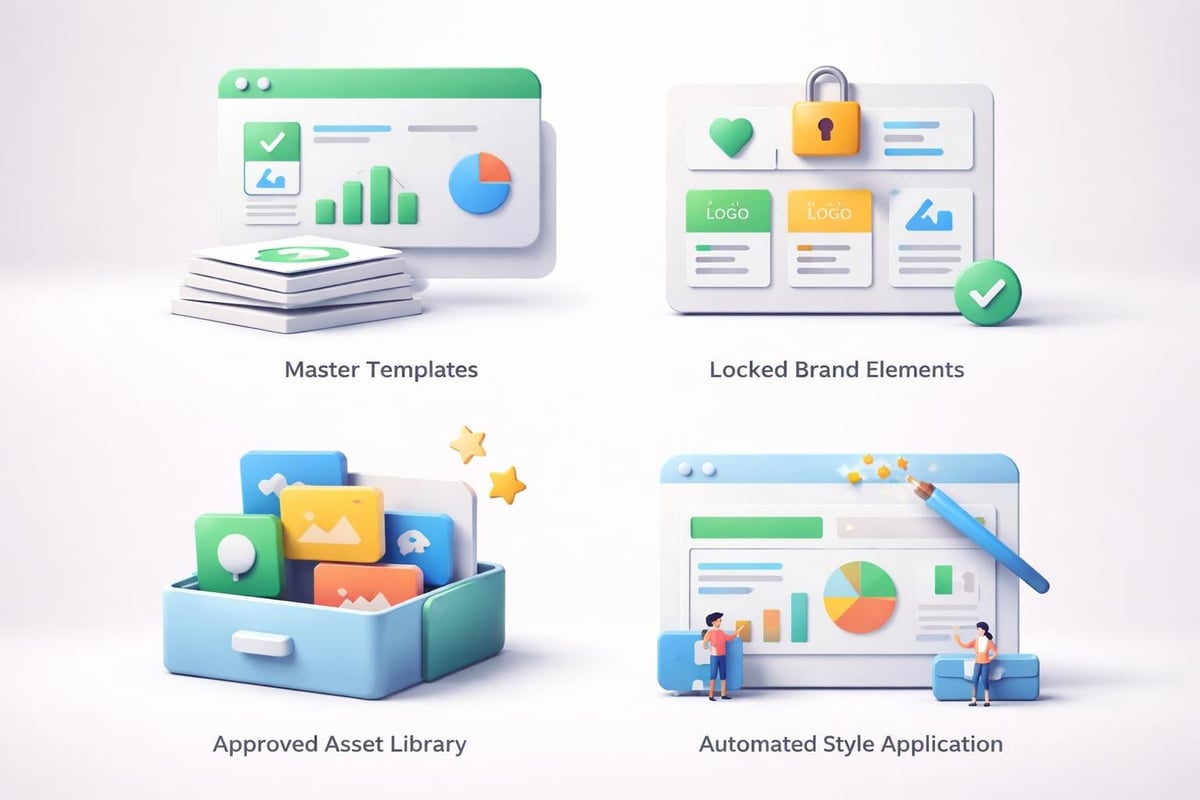
Maintaining brand integrity across presentations created by multiple team members requires robust brand management features. Enterprise-grade platforms should provide centralized control over typography, color palettes, logo usage, and layout standards.
Consider how PPT layout design principles translate into platform capabilities. The best tools enforce brand standards through templates while allowing flexibility for unique content requirements.
Workflow Integration and Productivity
A website to make presentations operates within broader business workflows. The platform's ability to integrate with existing tools and processes directly impacts team productivity and adoption rates.
Collaboration Patterns in Professional Settings
Different teams require different collaboration models:
- Sequential review: Content flows through defined approval stages
- Parallel contribution: Multiple experts develop sections simultaneously
- Client co-creation: External stakeholders participate in development
- Template deployment: Teams create from standardized starting points
Platforms like iSpring Suite emphasize structured content development with built-in review workflows and approval processes. This approach suits regulated industries where presentation content requires compliance verification before distribution.
Asset Management Considerations
Professional presentations draw from extensive asset libraries including stock photography, custom illustrations, data visualizations, and brand elements. Effective platforms provide robust digital asset management or integrate with existing DAM systems.
| Asset Type | Storage Needs | Access Pattern | Version Control |
|---|---|---|---|
| Templates | Centralized | Read-only | Critical |
| Brand assets | Centralized | Read-only | Critical |
| Stock images | Distributed | Read-write | Optional |
| Client data | Project-based | Read-write | Critical |
Organizations creating high-stakes presentations benefit from platforms offering granular permission controls, audit trails, and rollback capabilities that prevent accidental asset overwrites or unauthorized modifications.
Advanced Features Driving Platform Selection
As presentation technology evolves, advanced capabilities increasingly influence platform selection for demanding business applications. Understanding these emerging features helps future-proof technology investments.
AI-Assisted Content Creation
Artificial intelligence now assists with multiple aspects of presentation development, from initial outlining through final design polish. Recent academic research demonstrates how multimodal AI frameworks can generate complete visual presentations from text descriptions, addressing long-standing challenges in automated slide creation.
Current AI implementations offer:
- Automated layout suggestions based on content type and volume
- Image recommendations matching slide topics and themes
- Color scheme generation harmonizing with existing brand standards
- Content summarization condensing complex information into key points
- Design critique identifying common mistakes and inconsistencies
While AI capabilities continue improving, human expertise remains essential for nuanced business communications. AI excels at routine tasks and initial drafts but struggles with strategic messaging decisions and audience-specific customization.
Interactive and Dynamic Content
Static slides no longer meet all presentation needs. Modern platforms increasingly support interactive elements that engage audiences and facilitate two-way communication during presentations.
Interactive capabilities include embedded videos, clickable navigation menus, animated transitions between data states, and live polling integration. These features transform presentations from one-way broadcasts into dynamic conversation enablers.
However, compatibility challenges arise when interactive elements don't transfer across platforms or presentation contexts. A presentation designed for browser-based delivery may lose functionality when exported to PDF or viewed through incompatible systems.
Platform Selection Framework
Choosing the optimal website to make presentations requires systematic evaluation aligned with specific business requirements. Different organizations prioritize different capabilities based on their presentation contexts and business objectives.
Decision Criteria for Financial Services
Financial institutions should prioritize:
- Security and compliance features including data encryption and access controls
- Precise data visualization supporting complex financial models
- Professional aesthetics aligning with corporate brand standards
- Audit trails documenting presentation creation and modifications
- Export flexibility supporting both digital and print distribution
The emphasis on compliance and precision often leads financial services firms toward enterprise platforms with robust governance features rather than consumer-focused tools offering broader creative flexibility.
Requirements for Tech Companies
Technology businesses typically require different platform characteristics reflecting their faster-paced, innovation-focused cultures. Key selection criteria include:
- Rapid iteration capabilities supporting agile development cycles
- Modern design aesthetics reflecting current visual trends
- Flexible customization accommodating evolving brand identity
- Easy updates enabling quick response to market changes
- Seamless integration with product demonstration tools
Tech companies often select platforms emphasizing speed and flexibility over governance and control, accepting some consistency trade-offs in exchange for creation velocity.

Cost Considerations and Value Assessment
Pricing models for online presentation platforms vary dramatically, from free consumer tiers to enterprise licensing requiring significant annual commitments. Understanding total cost of ownership helps organizations make informed investment decisions.
Pricing Structures Compared
| Platform Type | Pricing Model | Typical Annual Cost | Best For |
|---|---|---|---|
| Free tools | Ad-supported | $0 | Individual users |
| Freemium | Feature-limited base | $0-$500 | Small teams |
| Professional | Per-user subscription | $500-$2,000 | Growing businesses |
| Enterprise | Volume licensing | $2,000-$10,000+ | Large organizations |
Beyond subscription fees, consider indirect costs including training time, template development, asset migration, and potential productivity losses during platform transitions. A website to make presentations delivers value through time savings, quality improvements, and reduced reliance on external design resources.
Build vs. Buy Decisions
Some organizations consider developing custom presentation solutions rather than adopting commercial platforms. This approach makes sense when:
- Unique requirements can't be met by existing tools
- Presentation volume justifies development investment
- Integration with proprietary systems drives significant efficiency
- Security or compliance needs exceed platform capabilities
However, most businesses benefit from commercial solutions that provide ongoing feature development, technical support, and guaranteed compatibility without internal development overhead.
Quality Standards and Professional Output
Selecting the right platform represents only part of the presentation quality equation. Understanding how to leverage platform capabilities effectively determines whether output meets professional standards expected in business contexts.
Template Quality and Customization
Pre-built templates accelerate creation but often require customization to match brand standards and specific content needs. Evaluate templates based on several criteria:
Design sophistication: Do layouts reflect current design trends while maintaining timeless professionalism?
Flexibility: Can templates accommodate different content volumes without breaking?
Brand adaptability: How easily do templates accept custom colors, fonts, and visual elements?
Professional designers understand that attractive PowerPoint templates provide starting points rather than finished products. The best platforms allow extensive customization while maintaining design integrity through smart constraints and formatting assistance.
Maintaining Visual Consistency
Consistency across multi-slide presentations requires deliberate attention to typography, spacing, color usage, and layout patterns. Platforms differ significantly in how they support consistency maintenance.
Features that promote consistency include:
- Master slide templates controlling global formatting
- Style libraries ensuring uniform text formatting
- Alignment guides preventing element misplacement
- Color pickers restricting selections to brand palettes
- Layout grids maintaining proportional relationships
Understanding presentation cover design principles helps creators establish visual themes that carry through entire decks, creating cohesive narratives that strengthen message retention and audience engagement.
Platform Limitations and Workarounds
No website to make presentations perfectly addresses every requirement. Understanding common limitations helps organizations develop workarounds or adjust workflows to minimize frustration and maintain productivity.
Common Platform Constraints
Technical limitations frequently encountered:
- File size restrictions preventing high-resolution media inclusion
- Font limitations when custom typography isn't fully supported
- Animation constraints reducing creative expression options
- Export quality degradation across different output formats
- Collaboration bottlenecks during simultaneous editing sessions
Organizations creating high-stakes presentations often develop hybrid workflows combining multiple tools. Initial development might occur in collaborative platforms, with final production migrating to specialized design software for polish and refinement.
When Professional Services Add Value
Even with excellent platforms, certain presentation contexts benefit from professional design expertise. Complex financial narratives, investor pitch decks, and keynote presentations for major industry events often warrant investment in specialized design services.
Prznt Perfect works with financial and tech businesses requiring presentations that exceed what standardized templates and general-purpose platforms deliver. Professional designers transform platform outputs into customized visual stories that reflect unique brand positioning and business objectives.
Emerging Trends Shaping Platform Evolution
The presentation software landscape continues evolving rapidly as new technologies and user expectations drive innovation. Understanding emerging trends helps organizations anticipate future capabilities and make forward-looking platform selections.
Video and Multimedia Integration
Modern business communications increasingly blend traditional slides with video content, screen recordings, and multimedia elements. Forward-thinking platforms integrate video editing capabilities directly into presentation workflows, eliminating the need for separate production tools.
This convergence addresses the growing expectation for dynamic, engaging content that holds audience attention in virtual and hybrid meeting environments where passive slide viewing leads to disengagement.
Accessibility and Inclusive Design
Regulatory requirements and corporate responsibility initiatives drive increased focus on presentation accessibility. Leading platforms now include features ensuring content remains accessible to users with visual, auditory, or cognitive disabilities.
Accessibility features include:
- Automated alt-text generation for images and graphics
- Color contrast checking against WCAG standards
- Screen reader compatibility throughout the editing interface
- Closed captioning for embedded video content
- Keyboard navigation supporting non-mouse interactions
Organizations prioritizing inclusive communications should evaluate platform accessibility features as primary selection criteria rather than optional enhancements.
Making the Final Platform Decision
After evaluating features, pricing, and alignment with business requirements, organizations face the practical challenge of platform selection and implementation. Successful transitions require planning that extends beyond feature comparisons.
Trial and Evaluation Process
Most platforms offer trial periods allowing hands-on evaluation before financial commitment. Maximize trial effectiveness by:
Creating representative content that matches actual business needs rather than simple test presentations
Involving multiple team members to assess collaboration features and gather diverse perspectives
Testing complete workflows from initial creation through final delivery and archival
Evaluating technical support responsiveness and knowledge during the trial period
Assessing integration capabilities with existing business systems and workflows
Real-world testing reveals nuances that feature lists and marketing materials obscure. A platform that appears ideal in demonstrations might prove frustrating during actual creation workflows.
Implementation and Adoption Strategy
Successfully transitioning to a new website to make presentations requires change management beyond software deployment. Consider these implementation elements:
- Training programs covering both basic functionality and advanced techniques
- Template development establishing brand-compliant starting points
- Migration planning for converting existing presentation libraries
- Champion identification designating power users who support team members
- Feedback mechanisms capturing user experiences and addressing pain points
Organizations achieving highest adoption rates treat platform selection as strategic initiatives rather than simple software purchases, investing appropriately in successful implementation.
Selecting the right website to make presentations ultimately depends on aligning platform capabilities with your specific business context, team workflows, and quality expectations. While numerous excellent options exist, complex financial and technical presentations often benefit from combining capable platforms with professional design expertise. Prznt Perfect specializes in transforming standard platform outputs into compelling visual narratives that drive business results, helping financial and tech companies communicate their value propositions with clarity and impact.


- This is some text inside of a div block.lay out the facts clearly and compellingly. Use data to establish the ground reality, but remember that facts alone are like the individual strands of a tapestry—necessary but not complete.lay out the facts clearly and compellingly. Use data to establish the ground reality, but remember that facts alone are like the individual strands of a tapestry—necessary but not complete.
- This is some text inside of a div block.lay out the facts clearly and compellingly. Use data to establish the ground reality, but remember that facts alone are like the individual strands of a tapestry—necessary but not complete.

.png)
