Purple PPT Template: Design Guide for Business Success

Professional presentations require strategic color choices that resonate with audiences while reinforcing brand messages. A purple ppt template offers a sophisticated alternative to conventional blue and gray schemes, bringing together creativity, luxury, and innovation in a single cohesive design system. For financial and tech businesses seeking to differentiate their visual communications, understanding how to effectively deploy purple templates can transform standard presentations into memorable experiences. This comprehensive guide explores the strategic advantages of purple templates, their psychological impact, and practical implementation strategies for maximizing presentation effectiveness in 2026.

The Psychology Behind Purple in Business Presentations

Understanding color psychology forms the foundation of effective presentation design. Purple occupies a unique position in the color spectrum, combining the stability of blue with the energy of red. This duality creates powerful associations that resonate deeply with business audiences.

The psychology of color in presentations demonstrates that purple conveys creativity, wisdom, and sophistication. These attributes align perfectly with financial services and technology sectors where innovation and trustworthiness must coexist. When executives present complex data or revolutionary products, a purple ppt template establishes credibility while signaling forward-thinking approaches.

Historical and Cultural Significance

Purple has maintained royal and luxurious connotations throughout history. Ancient civilizations associated the color with power and exclusivity because purple dyes were expensive and rare. This heritage translates into modern business contexts where premium positioning matters.

Key psychological associations with purple:

  • Innovation and creativity
  • Luxury and premium quality
  • Wisdom and expertise
  • Ambition and independence
  • Transformation and change

The psychological significance of purple extends beyond surface aesthetics. Research indicates that purple stimulates problem-solving and creative thinking, making it particularly effective for presentations that introduce new concepts or challenge conventional wisdom. Financial technology companies launching disruptive products benefit significantly from these cognitive associations.

Purple color psychology in presentations

Strategic Advantages of Purple PPT Templates

Selecting a purple ppt template delivers measurable advantages beyond aesthetic appeal. Strategic color deployment influences how audiences process information, remember key messages, and perceive presenter credibility.

Differentiation in Competitive Markets

Most corporate presentations default to blue, black, or gray color schemes. This homogeneity creates opportunity for businesses willing to break convention. A thoughtfully designed purple ppt template immediately distinguishes your presentation from competitors, capturing attention in crowded investment meetings or conference environments.

Market research shows that color choices significantly impact brand recognition, with purple offering particularly strong recall rates. When your pitch deck features distinctive purple design elements, investors and clients remember your brand more readily than generic alternatives.

Versatility Across Business Contexts

Purple templates adapt remarkably well to diverse presentation scenarios:

  1. Investor pitch decks where premium positioning matters
  2. Product launches requiring innovation signals
  3. Strategic planning presentations emphasizing transformation
  4. Executive briefings demanding sophistication
  5. Conference keynotes seeking memorable impact

The professional PowerPoint approaches that incorporate purple maintain flexibility across these contexts while preserving brand consistency. This versatility makes purple templates valuable investments for businesses maintaining diverse presentation portfolios.

Design Elements That Maximize Purple Template Effectiveness

Creating compelling presentations requires more than selecting purple backgrounds. Sophisticated design integrates color psychology with layout principles, typography choices, and visual hierarchy systems.

Color Palette Development

Successful purple ppt template implementation begins with strategic palette construction. Pure purple rarely works alone-it requires complementary and accent colors that enhance readability and visual interest.

Primary Use Color Selection Strategic Purpose
Main backgrounds Light lavender or deep plum Establishes brand presence
Text and data Charcoal or white Ensures readability
Accents and highlights Gold, teal, or coral Creates visual hierarchy
Charts and graphs Purple gradient scales Maintains coherence

These combinations create sophisticated visual systems that guide audience attention while maintaining professional credibility. The key lies in balancing purple prominence with functional clarity-your presentation layout must prioritize information accessibility above decorative elements.

Typography and Readability Considerations

Purple backgrounds demand careful font selection. Light purple hues pair well with dark typography, while deep purple requires lighter text colors. Sans-serif fonts like Montserrat, Poppins, or Helvetica provide clean readability against purple backgrounds.

Typography best practices for purple templates:

  • Maintain minimum 18pt font size for body text
  • Use 32pt or larger for headlines
  • Ensure 4.5:1 contrast ratio between text and background
  • Limit font families to two maximum
  • Apply consistent hierarchy across all slides

These principles ensure your purple ppt template maintains professional standards while delivering visual impact. Text readability directly affects message retention, making these technical specifications non-negotiable for business presentations.

Typography on purple backgrounds

Customization Strategies for Industry-Specific Applications

Generic templates rarely address specific business needs. Customizing purple ppt template designs for financial services or technology sectors requires understanding industry expectations and audience preferences.

Financial Services Customization

Financial presentations demand data visualization capabilities and conservative design elements. A purple ppt template for finance should incorporate:

  • Robust chart templates for financial metrics
  • Table layouts supporting complex data sets
  • Timeline graphics for strategic planning
  • Icon systems representing financial concepts
  • Section dividers maintaining visual flow

The balance between creativity and conservatism proves crucial. While purple signals innovation, excessive experimentation undermines credibility in financial contexts. Your company presentation should lean toward sophisticated minimalism rather than bold artistic statements.

Technology Sector Applications

Technology companies enjoy greater creative latitude. Purple ppt template designs for tech presentations can embrace:

  1. Gradient backgrounds suggesting digital innovation
  2. Geometric shapes representing systems thinking
  3. Animation-ready layouts for dynamic delivery
  4. Dark mode variations for technical audiences
  5. Modular components supporting agile updates

These elements position technology businesses as forward-thinking and innovative. The attractive PowerPoint templates that succeed in tech environments often push creative boundaries while maintaining information clarity.

Template Selection and Quality Assessment

Choosing the right purple ppt template requires evaluating multiple factors beyond initial visual appeal. Quality templates provide comprehensive slide libraries, maintain design consistency, and offer customization flexibility.

Essential Template Components

Professional templates should include these foundational elements:

Component Category Required Slides Quality Indicators
Opening sequences Title, agenda, introduction Impactful visuals, clear hierarchy
Content delivery Text, bullet points, quotes Readable layouts, balanced spacing
Data visualization Charts, graphs, tables, timelines Customizable formats, clear legends
Visual breaks Section dividers, chapter pages Maintains attention, provides pacing
Closing materials Thank you, contact, Q&A Reinforces branding, enables action

Resources like SlideEgg's purple templates offer comprehensive slide libraries that address diverse presentation needs. However, quality varies significantly across template marketplaces. Evaluate samples thoroughly before committing to specific designs.

Customization Capabilities

The best purple ppt template provides extensive customization without requiring advanced design skills. Look for templates featuring:

  • Editable color schemes with one-click palette changes
  • Resizable elements maintaining aspect ratios
  • Master slide systems enabling global updates
  • Compatible fonts with adequate licensing
  • Icon libraries supporting concept illustration

Templates with limited customization create frustration during urgent presentation development. Your template should accelerate production rather than constrain creative expression. The best PPT presentation templates balance pre-designed excellence with modification flexibility.

Template customization workflow

Implementation Best Practices for Maximum Impact

Acquiring a quality purple ppt template represents just the beginning. Strategic implementation determines whether your presentations achieve their intended objectives. These practices separate amateur slide decks from professional communications that drive business results.

Brand Integration Techniques

Your purple ppt template must align with existing brand guidelines while introducing fresh visual approaches. This balance requires thoughtful integration rather than wholesale brand replacement.

Steps for effective brand integration:

  1. Extract exact purple shades from brand color palettes
  2. Incorporate logo placements on master slides
  3. Apply brand fonts as primary typography
  4. Include approved imagery styles and photo treatments
  5. Maintain consistent spacing matching brand standards

When your organization lacks formal brand guidelines, your purple template can establish new standards. Document color codes, font specifications, and layout rules to ensure consistency across future presentations. This foundation supports scalable brand management as your business grows.

Data Visualization Optimization

Purple backgrounds present unique challenges and opportunities for data visualization. Charts and graphs require careful color selection to maintain readability while supporting analytical insights.

Consider these data visualization strategies:

  • Use monochromatic purple scales for single-variable data
  • Apply complementary accent colors for multi-variable comparisons
  • Maintain white or light backgrounds for complex datasets
  • Employ darker purple for callout boxes highlighting key findings
  • Design custom icon sets representing data categories

Financial presentations particularly benefit from sophisticated data visualization. When presenting quarterly results or investment opportunities, your charts must communicate complex information instantly. The presentation cover design sets expectations, but internal data slides deliver substantive value.

Common Mistakes to Avoid with Purple Templates

Even high-quality purple ppt template designs fail when misapplied. Understanding common pitfalls helps presenters maximize template effectiveness while avoiding presentation disasters.

Overuse of Purple Elements

The most frequent mistake involves saturating every slide with purple. This approach creates visual fatigue and diminishes purple's strategic impact. Effective presentations use purple purposefully:

  • Apply full purple backgrounds to 30-40% of slides maximum
  • Use purple accents and highlights throughout
  • Incorporate white or neutral slides for visual breaks
  • Reserve deepest purple shades for emphasis moments
  • Allow breathing room with minimalist layouts

Balance creates sophistication. When every element screams for attention, nothing receives focus. Your purple ppt template should guide audience attention strategically rather than overwhelming viewers with constant stimulation.

Ignoring Accessibility Requirements

Color blindness affects approximately 8% of men and 0.5% of women. Purple-green combinations prove particularly problematic for deuteranopia sufferers. Ensure your template maintains accessibility through:

Accessibility Feature Implementation Method Business Benefit
Sufficient contrast Test with online contrast checkers Improves readability for all viewers
Alternative indicators Use icons and shapes beyond color Ensures comprehension regardless of vision
Text redundancy Label all charts and graphs clearly Eliminates confusion from color dependence
Print compatibility Design for grayscale conversion Enables handout distribution

Professional presentations prioritize inclusivity. Your purple ppt template should communicate effectively regardless of viewing conditions or audience capabilities. This commitment to accessibility demonstrates organizational professionalism and attention to detail.

Advanced Techniques for Purple Template Mastery

Once fundamental implementation succeeds, advanced techniques elevate presentations from competent to exceptional. These strategies require additional effort but deliver proportional returns through enhanced audience engagement and message retention.

Dynamic Animation Integration

Purple's richness lends itself beautifully to subtle animation effects. Strategic motion design guides attention and reveals information progressively:

  • Fade-in effects for bullet points maintaining audience focus
  • Slide transitions matching corporate sophistication levels
  • Chart animations building data stories sequentially
  • Subtle parallax effects adding depth perception
  • Morphing transitions between related concepts

Animation should enhance rather than distract. The goal involves supporting message delivery through purposeful motion, not entertaining audiences with gratuitous effects. When investors review your pitch deck independently, animations should clarify rather than confuse static content.

Multi-Format Optimization

Modern presentations exist across multiple formats and platforms. Your purple ppt template must perform consistently whether displayed on conference screens, laptop monitors, or mobile devices.

Format optimization checklist:

  1. Test readability at 1920x1080 and 1366x768 resolutions
  2. Verify mobile compatibility for tablet review
  3. Confirm PDF export maintains visual integrity
  4. Ensure print versions remain legible in grayscale
  5. Validate web presentation platforms render correctly

These technical considerations prevent embarrassing failures during high-stakes presentations. Nothing undermines credibility faster than broken layouts or illegible text when presenting to executive committees or investor groups.

Industry Resources and Inspiration Sources

Continuous improvement requires studying exemplary work and understanding evolving design trends. Several resources provide valuable inspiration for purple ppt template development and application.

Template Marketplaces and Design Platforms

Professional template marketplaces offer curated purple designs suitable for business applications. PPTStar's stylish purple templates and Venngage's minimalist purple designs demonstrate contemporary approaches balancing aesthetics with functionality.

However, marketplace templates require customization for specific business contexts. Generic designs lack the strategic alignment that professional agencies provide through custom development. Consider templates as starting points requiring refinement rather than finished products.

Professional Design Communities

Design communities offer tutorials, trend analysis, and peer feedback supporting continuous skill development. Following presentation design thought leaders provides insights into emerging techniques and shifting audience expectations.

For businesses lacking internal design expertise, partnering with specialized agencies ensures professional results without extensive learning curves. The investment in expert presentation design typically returns multiples through improved pitch success rates and enhanced brand perception.

Technical Specifications for Purple Template Development

Creating custom purple ppt template designs requires understanding technical specifications that ensure compatibility and performance. These details matter particularly for businesses maintaining large presentation libraries across distributed teams.

File Structure and Organization

Professional templates employ organized file structures supporting efficient collaboration:

  • Master slide systems defining global design elements
  • Layout slides addressing specific content types
  • Color theme files enabling one-click palette changes
  • Custom font embedding preventing rendering issues
  • Asset libraries containing approved images and icons

Proper file organization accelerates presentation development while ensuring brand consistency. When multiple team members create presentations simultaneously, structural standards prevent design drift and maintain professional quality.

Performance Optimization

Large presentation files create problems during sharing and presenting. Optimize your purple ppt template through:

  1. Image compression reducing file sizes without visible quality loss
  2. Font subsetting including only used characters
  3. Animation simplification preventing playback issues
  4. Smart art conversion to editable shapes
  5. Embedded video optimization or external linking

These technical refinements ensure smooth performance during critical presentations. File size matters increasingly as presentations move to cloud platforms and mobile devices where bandwidth limitations affect loading times.


Mastering purple ppt template design and implementation provides competitive advantages in financial and technology sectors where visual differentiation drives business success. The strategic application of purple psychology, combined with professional design principles and technical excellence, transforms standard presentations into persuasive business tools that command attention and inspire action. Whether you're developing templates internally or seeking expert assistance, Prznt Perfect specializes in creating visually stunning presentations that transform complex data into compelling narratives for financial and tech businesses, delivering the professional impact your brand deserves.

We offer free 30-min consultation on the presentation design audit
and hiring the right visual 
comms professional, let’s talk!
Shedule a call
Shedule a call
"I understand" goes a step further into the cognitive dance of persuasion. It's where the audience begins to see the connections between the facts, to grasp the nuances of the problem and the elegance of the solution.
  • This is some text inside of a div block.
    lay out the facts clearly and compellingly. Use data to establish the ground reality, but remember that facts alone are like the individual strands of a tapestry—necessary but not complete.
    lay out the facts clearly and compellingly. Use data to establish the ground reality, but remember that facts alone are like the individual strands of a tapestry—necessary but not complete.
  • This is some text inside of a div block.
    lay out the facts clearly and compellingly. Use data to establish the ground reality, but remember that facts alone are like the individual strands of a tapestry—necessary but not complete.

We offer free 30-min consultation on the presentation design audit

and hiring the right visual 
comms professional, let’s talk!

Shedule a call

"I understand" goes a step further into the cognitive dance of persuasion. It's where the audience begins to see the connections between the facts, to grasp the nuances of the problem and the elegance of the solution.

  • - 1 -
    Consistency at Scale:

    Biotech Market Trends 2024: Tailoring Your Pitch Deck to Current Industry Dynamics.

  • - 2 -
    Efficiency and Speed:

    The traditional process of manually updating presentations is not only slow but also prone to bottlenecks, especially when dealing with large volumes of slides. Automation dramatically accelerates this process, enabling designers to apply changes across hundreds of slides in the time it would take to manually update a single one. This efficiency is a game-changer for agencies working under tight deadlines or managing multiple projects simultaneously.

  • - 3 -
    Enhanced Creativity:

    With the burden of manual updates lifted, designers can allocate more time and energy to the creative aspects of presentation design. This freedom allows for deeper exploration of innovative design concepts, experimentation with new visual storytelling techniques, and the development of more engaging and interactive presentations. Automation doesn't stifle creativity; it amplifies it, enabling designers to push the boundaries of what's possible in corporate presentation design.

  • - 4 -
    Error Reduction:

    Manual updates are inherently prone to inconsistencies and mistakes, from misaligned logos to incorrect font sizes. These errors can detract from the professionalism of a presentation and, by extension, the corporate image. Automation minimizes these risks by ensuring that updates are applied uniformly and accurately across all slides, enhancing the overall quality and integrity of the presentation.

  • - 5 -
    Cost-Effectiveness:

    The time savings afforded by automation directly translate to cost savings for both the design agency and its clients. By reducing the hours spent on manual updates, agencies can optimize their workflows and resources, allowing them to take on more projects without compromising on quality. This efficiency can also make high-quality presentation design services more affordable and accessible to a broader range of businesses.

Purple PPT Template: Design Guide for Business Success
Discover how a purple ppt template can elevate your business presentations. Expert insights on color psychology, design strategies, and template selection.

Professional presentations require strategic color choices that resonate with audiences while reinforcing brand messages. A purple ppt template offers a sophisticated alternative to conventional blue and gray schemes, bringing together creativity, luxury, and innovation in a single cohesive design system. For financial and tech businesses seeking to differentiate their visual communications, understanding how to effectively deploy purple templates can transform standard presentations into memorable experiences. This comprehensive guide explores the strategic advantages of purple templates, their psychological impact, and practical implementation strategies for maximizing presentation effectiveness in 2026.

The Psychology Behind Purple in Business Presentations

Understanding color psychology forms the foundation of effective presentation design. Purple occupies a unique position in the color spectrum, combining the stability of blue with the energy of red. This duality creates powerful associations that resonate deeply with business audiences.

The psychology of color in presentations demonstrates that purple conveys creativity, wisdom, and sophistication. These attributes align perfectly with financial services and technology sectors where innovation and trustworthiness must coexist. When executives present complex data or revolutionary products, a purple ppt template establishes credibility while signaling forward-thinking approaches.

Historical and Cultural Significance

Purple has maintained royal and luxurious connotations throughout history. Ancient civilizations associated the color with power and exclusivity because purple dyes were expensive and rare. This heritage translates into modern business contexts where premium positioning matters.

Key psychological associations with purple:

  • Innovation and creativity
  • Luxury and premium quality
  • Wisdom and expertise
  • Ambition and independence
  • Transformation and change

The psychological significance of purple extends beyond surface aesthetics. Research indicates that purple stimulates problem-solving and creative thinking, making it particularly effective for presentations that introduce new concepts or challenge conventional wisdom. Financial technology companies launching disruptive products benefit significantly from these cognitive associations.

Purple color psychology in presentations

Strategic Advantages of Purple PPT Templates

Selecting a purple ppt template delivers measurable advantages beyond aesthetic appeal. Strategic color deployment influences how audiences process information, remember key messages, and perceive presenter credibility.

Differentiation in Competitive Markets

Most corporate presentations default to blue, black, or gray color schemes. This homogeneity creates opportunity for businesses willing to break convention. A thoughtfully designed purple ppt template immediately distinguishes your presentation from competitors, capturing attention in crowded investment meetings or conference environments.

Market research shows that color choices significantly impact brand recognition, with purple offering particularly strong recall rates. When your pitch deck features distinctive purple design elements, investors and clients remember your brand more readily than generic alternatives.

Versatility Across Business Contexts

Purple templates adapt remarkably well to diverse presentation scenarios:

  1. Investor pitch decks where premium positioning matters
  2. Product launches requiring innovation signals
  3. Strategic planning presentations emphasizing transformation
  4. Executive briefings demanding sophistication
  5. Conference keynotes seeking memorable impact

The professional PowerPoint approaches that incorporate purple maintain flexibility across these contexts while preserving brand consistency. This versatility makes purple templates valuable investments for businesses maintaining diverse presentation portfolios.

Design Elements That Maximize Purple Template Effectiveness

Creating compelling presentations requires more than selecting purple backgrounds. Sophisticated design integrates color psychology with layout principles, typography choices, and visual hierarchy systems.

Color Palette Development

Successful purple ppt template implementation begins with strategic palette construction. Pure purple rarely works alone-it requires complementary and accent colors that enhance readability and visual interest.

Primary Use Color Selection Strategic Purpose
Main backgrounds Light lavender or deep plum Establishes brand presence
Text and data Charcoal or white Ensures readability
Accents and highlights Gold, teal, or coral Creates visual hierarchy
Charts and graphs Purple gradient scales Maintains coherence

These combinations create sophisticated visual systems that guide audience attention while maintaining professional credibility. The key lies in balancing purple prominence with functional clarity-your presentation layout must prioritize information accessibility above decorative elements.

Typography and Readability Considerations

Purple backgrounds demand careful font selection. Light purple hues pair well with dark typography, while deep purple requires lighter text colors. Sans-serif fonts like Montserrat, Poppins, or Helvetica provide clean readability against purple backgrounds.

Typography best practices for purple templates:

  • Maintain minimum 18pt font size for body text
  • Use 32pt or larger for headlines
  • Ensure 4.5:1 contrast ratio between text and background
  • Limit font families to two maximum
  • Apply consistent hierarchy across all slides

These principles ensure your purple ppt template maintains professional standards while delivering visual impact. Text readability directly affects message retention, making these technical specifications non-negotiable for business presentations.

Typography on purple backgrounds

Customization Strategies for Industry-Specific Applications

Generic templates rarely address specific business needs. Customizing purple ppt template designs for financial services or technology sectors requires understanding industry expectations and audience preferences.

Financial Services Customization

Financial presentations demand data visualization capabilities and conservative design elements. A purple ppt template for finance should incorporate:

  • Robust chart templates for financial metrics
  • Table layouts supporting complex data sets
  • Timeline graphics for strategic planning
  • Icon systems representing financial concepts
  • Section dividers maintaining visual flow

The balance between creativity and conservatism proves crucial. While purple signals innovation, excessive experimentation undermines credibility in financial contexts. Your company presentation should lean toward sophisticated minimalism rather than bold artistic statements.

Technology Sector Applications

Technology companies enjoy greater creative latitude. Purple ppt template designs for tech presentations can embrace:

  1. Gradient backgrounds suggesting digital innovation
  2. Geometric shapes representing systems thinking
  3. Animation-ready layouts for dynamic delivery
  4. Dark mode variations for technical audiences
  5. Modular components supporting agile updates

These elements position technology businesses as forward-thinking and innovative. The attractive PowerPoint templates that succeed in tech environments often push creative boundaries while maintaining information clarity.

Template Selection and Quality Assessment

Choosing the right purple ppt template requires evaluating multiple factors beyond initial visual appeal. Quality templates provide comprehensive slide libraries, maintain design consistency, and offer customization flexibility.

Essential Template Components

Professional templates should include these foundational elements:

Component Category Required Slides Quality Indicators
Opening sequences Title, agenda, introduction Impactful visuals, clear hierarchy
Content delivery Text, bullet points, quotes Readable layouts, balanced spacing
Data visualization Charts, graphs, tables, timelines Customizable formats, clear legends
Visual breaks Section dividers, chapter pages Maintains attention, provides pacing
Closing materials Thank you, contact, Q&A Reinforces branding, enables action

Resources like SlideEgg's purple templates offer comprehensive slide libraries that address diverse presentation needs. However, quality varies significantly across template marketplaces. Evaluate samples thoroughly before committing to specific designs.

Customization Capabilities

The best purple ppt template provides extensive customization without requiring advanced design skills. Look for templates featuring:

  • Editable color schemes with one-click palette changes
  • Resizable elements maintaining aspect ratios
  • Master slide systems enabling global updates
  • Compatible fonts with adequate licensing
  • Icon libraries supporting concept illustration

Templates with limited customization create frustration during urgent presentation development. Your template should accelerate production rather than constrain creative expression. The best PPT presentation templates balance pre-designed excellence with modification flexibility.
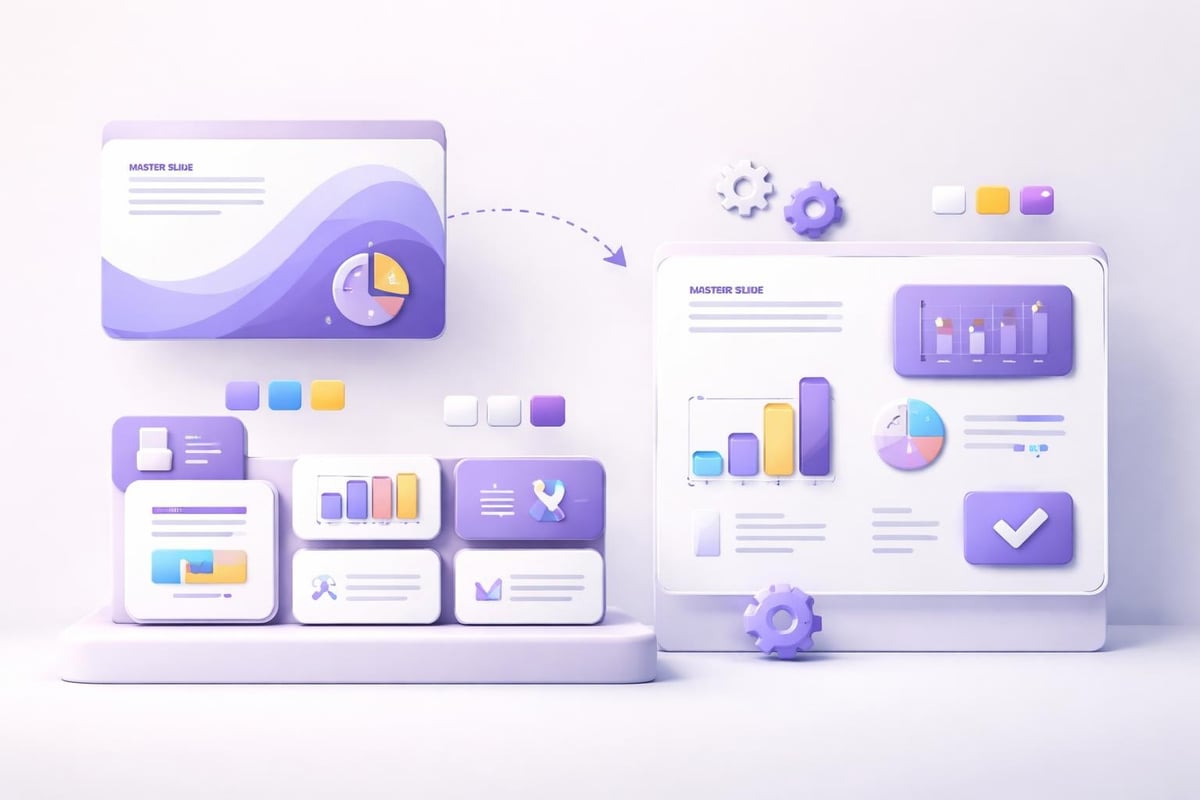
Template customization workflow

Implementation Best Practices for Maximum Impact

Acquiring a quality purple ppt template represents just the beginning. Strategic implementation determines whether your presentations achieve their intended objectives. These practices separate amateur slide decks from professional communications that drive business results.

Brand Integration Techniques

Your purple ppt template must align with existing brand guidelines while introducing fresh visual approaches. This balance requires thoughtful integration rather than wholesale brand replacement.

Steps for effective brand integration:

  1. Extract exact purple shades from brand color palettes
  2. Incorporate logo placements on master slides
  3. Apply brand fonts as primary typography
  4. Include approved imagery styles and photo treatments
  5. Maintain consistent spacing matching brand standards

When your organization lacks formal brand guidelines, your purple template can establish new standards. Document color codes, font specifications, and layout rules to ensure consistency across future presentations. This foundation supports scalable brand management as your business grows.

Data Visualization Optimization

Purple backgrounds present unique challenges and opportunities for data visualization. Charts and graphs require careful color selection to maintain readability while supporting analytical insights.

Consider these data visualization strategies:

  • Use monochromatic purple scales for single-variable data
  • Apply complementary accent colors for multi-variable comparisons
  • Maintain white or light backgrounds for complex datasets
  • Employ darker purple for callout boxes highlighting key findings
  • Design custom icon sets representing data categories

Financial presentations particularly benefit from sophisticated data visualization. When presenting quarterly results or investment opportunities, your charts must communicate complex information instantly. The presentation cover design sets expectations, but internal data slides deliver substantive value.

Common Mistakes to Avoid with Purple Templates

Even high-quality purple ppt template designs fail when misapplied. Understanding common pitfalls helps presenters maximize template effectiveness while avoiding presentation disasters.

Overuse of Purple Elements

The most frequent mistake involves saturating every slide with purple. This approach creates visual fatigue and diminishes purple's strategic impact. Effective presentations use purple purposefully:

  • Apply full purple backgrounds to 30-40% of slides maximum
  • Use purple accents and highlights throughout
  • Incorporate white or neutral slides for visual breaks
  • Reserve deepest purple shades for emphasis moments
  • Allow breathing room with minimalist layouts

Balance creates sophistication. When every element screams for attention, nothing receives focus. Your purple ppt template should guide audience attention strategically rather than overwhelming viewers with constant stimulation.

Ignoring Accessibility Requirements

Color blindness affects approximately 8% of men and 0.5% of women. Purple-green combinations prove particularly problematic for deuteranopia sufferers. Ensure your template maintains accessibility through:

Accessibility Feature Implementation Method Business Benefit
Sufficient contrast Test with online contrast checkers Improves readability for all viewers
Alternative indicators Use icons and shapes beyond color Ensures comprehension regardless of vision
Text redundancy Label all charts and graphs clearly Eliminates confusion from color dependence
Print compatibility Design for grayscale conversion Enables handout distribution

Professional presentations prioritize inclusivity. Your purple ppt template should communicate effectively regardless of viewing conditions or audience capabilities. This commitment to accessibility demonstrates organizational professionalism and attention to detail.

Advanced Techniques for Purple Template Mastery

Once fundamental implementation succeeds, advanced techniques elevate presentations from competent to exceptional. These strategies require additional effort but deliver proportional returns through enhanced audience engagement and message retention.

Dynamic Animation Integration

Purple's richness lends itself beautifully to subtle animation effects. Strategic motion design guides attention and reveals information progressively:

  • Fade-in effects for bullet points maintaining audience focus
  • Slide transitions matching corporate sophistication levels
  • Chart animations building data stories sequentially
  • Subtle parallax effects adding depth perception
  • Morphing transitions between related concepts

Animation should enhance rather than distract. The goal involves supporting message delivery through purposeful motion, not entertaining audiences with gratuitous effects. When investors review your pitch deck independently, animations should clarify rather than confuse static content.

Multi-Format Optimization

Modern presentations exist across multiple formats and platforms. Your purple ppt template must perform consistently whether displayed on conference screens, laptop monitors, or mobile devices.

Format optimization checklist:

  1. Test readability at 1920x1080 and 1366x768 resolutions
  2. Verify mobile compatibility for tablet review
  3. Confirm PDF export maintains visual integrity
  4. Ensure print versions remain legible in grayscale
  5. Validate web presentation platforms render correctly

These technical considerations prevent embarrassing failures during high-stakes presentations. Nothing undermines credibility faster than broken layouts or illegible text when presenting to executive committees or investor groups.

Industry Resources and Inspiration Sources

Continuous improvement requires studying exemplary work and understanding evolving design trends. Several resources provide valuable inspiration for purple ppt template development and application.

Template Marketplaces and Design Platforms

Professional template marketplaces offer curated purple designs suitable for business applications. PPTStar's stylish purple templates and Venngage's minimalist purple designs demonstrate contemporary approaches balancing aesthetics with functionality.

However, marketplace templates require customization for specific business contexts. Generic designs lack the strategic alignment that professional agencies provide through custom development. Consider templates as starting points requiring refinement rather than finished products.

Professional Design Communities

Design communities offer tutorials, trend analysis, and peer feedback supporting continuous skill development. Following presentation design thought leaders provides insights into emerging techniques and shifting audience expectations.

For businesses lacking internal design expertise, partnering with specialized agencies ensures professional results without extensive learning curves. The investment in expert presentation design typically returns multiples through improved pitch success rates and enhanced brand perception.

Technical Specifications for Purple Template Development

Creating custom purple ppt template designs requires understanding technical specifications that ensure compatibility and performance. These details matter particularly for businesses maintaining large presentation libraries across distributed teams.

File Structure and Organization

Professional templates employ organized file structures supporting efficient collaboration:

  • Master slide systems defining global design elements
  • Layout slides addressing specific content types
  • Color theme files enabling one-click palette changes
  • Custom font embedding preventing rendering issues
  • Asset libraries containing approved images and icons

Proper file organization accelerates presentation development while ensuring brand consistency. When multiple team members create presentations simultaneously, structural standards prevent design drift and maintain professional quality.

Performance Optimization

Large presentation files create problems during sharing and presenting. Optimize your purple ppt template through:

  1. Image compression reducing file sizes without visible quality loss
  2. Font subsetting including only used characters
  3. Animation simplification preventing playback issues
  4. Smart art conversion to editable shapes
  5. Embedded video optimization or external linking

These technical refinements ensure smooth performance during critical presentations. File size matters increasingly as presentations move to cloud platforms and mobile devices where bandwidth limitations affect loading times.


Mastering purple ppt template design and implementation provides competitive advantages in financial and technology sectors where visual differentiation drives business success. The strategic application of purple psychology, combined with professional design principles and technical excellence, transforms standard presentations into persuasive business tools that command attention and inspire action. Whether you're developing templates internally or seeking expert assistance, Prznt Perfect specializes in creating visually stunning presentations that transform complex data into compelling narratives for financial and tech businesses, delivering the professional impact your brand deserves.


News & Updates...

Discover how a presentation design firm transforms complex data into compelling visual narratives for financial and tech businesses in 2026.

Master presentation management with proven strategies for organizing, controlling, and optimizing business presentations in financial and tech sectors.