
Infographic Design for Executives: Visual Impact Guide

Executive audiences demand precision, clarity, and immediate value from every presentation element. When time is measured in milliseconds and decisions carry million-dollar consequences, traditional text-heavy slides fail to deliver the impact needed. Infographic design for executives represents a fundamental shift in how complex information reaches C-suite decision-makers, transforming dense data sets and strategic insights into visual narratives that drive action. The most effective executive infographics don't just display information-they architect comprehension, enabling leaders to grasp critical trends, identify opportunities, and make informed decisions within seconds.
Understanding the Executive Mindset
Executive decision-makers operate under unique constraints that directly influence how they consume information. The average C-suite leader dedicates less than 90 seconds to evaluating any single presentation slide, creating an environment where visual efficiency becomes paramount.
Time Constraints and Decision Velocity
Senior leaders juggle multiple priorities simultaneously, from quarterly earnings calls to strategic planning sessions. Their cognitive bandwidth for processing information remains finite, making infographic design for executives a critical tool for breaking through the noise. Effective visual communication respects this reality by frontloading key insights and eliminating unnecessary complexity.
Key characteristics of executive information processing:
- Scanning patterns: Executives typically follow Z-pattern or F-pattern eye movements when reviewing slides
- Decision frameworks: Leaders seek data that confirms or challenges existing hypotheses
- Action orientation: Information must connect directly to strategic outcomes and next steps
- Risk assessment: Visual presentations should clarify potential impacts and trade-offs
Research from Hypothesis Group discusses five key principles that align perfectly with how executives absorb information, emphasizing focus and hierarchy as non-negotiable elements.

The Cost of Visual Confusion
When infographic design for executives misses the mark, the consequences extend beyond mere confusion. Poorly designed visuals can derail strategic discussions, create alignment issues across leadership teams, and ultimately cost organizations valuable time and resources. A single unclear chart in a board presentation can trigger 30 minutes of clarifying questions, derailing carefully planned agendas.
The financial sector particularly suffers from this challenge, where data visualization presentation complexity demands exceptional clarity to communicate market trends, risk exposures, and performance metrics effectively.
Core Principles of Executive-Focused Infographics
Creating visuals that resonate with leadership requires adherence to specific design principles tailored for high-stakes environments. These principles form the foundation of effective infographic design for executives across industries.
Strategic Hierarchy and Information Architecture
Visual hierarchy determines whether executives grasp your message immediately or struggle to find meaning. Every element within an infographic must serve a clear purpose within the information hierarchy.
| Hierarchy Level | Visual Treatment | Executive Function |
|---|---|---|
| Primary Insight | Largest font, bold color, top placement | Immediate comprehension of key message |
| Supporting Data | Medium emphasis, strategic positioning | Context and validation for primary point |
| Detailed Metrics | Smaller scale, accessible but secondary | Available for deeper analysis if needed |
| Annotations | Minimal, contextual placement | Clarification without distraction |
The Lumina Foundation outlines principles for creating infographics that ensure accurate representation while maintaining the clarity executives demand. Their approach to data storytelling emphasizes truthful visualization without oversimplification.
Data Density Versus Clarity
One of the most challenging aspects of infographic design for executives involves balancing comprehensive data presentation with visual simplicity. While executives appreciate thorough analysis, they require information architecture that reveals insights progressively.
Optimal density strategies:
- Primary layer: The headline metric or trend visible within 3 seconds
- Secondary layer: Supporting data points accessible through natural visual flow
- Tertiary layer: Detailed breakdowns available for scrutiny without cluttering main message
- Context layer: Benchmarks, timeframes, and comparisons positioned strategically
This layered approach enables executives to engage with information at their chosen depth while maintaining presentation momentum. When developing professional PowerPoint presentation materials, this principle separates effective communication from overwhelming data dumps.
Design Elements That Drive Executive Engagement
Beyond theoretical principles, specific design components consistently elevate infographic design for executives from adequate to exceptional. These elements work together to create visual communications that command attention and facilitate understanding.
Color Strategy for Authority and Clarity
Color choices in executive infographics serve dual purposes: reinforcing brand identity while creating functional differentiation. The most effective approaches avoid trendy palettes in favor of sophisticated, purposeful color systems.
- Primary brand colors: Limited to 2-3 core shades that anchor the visual identity
- Functional colors: Green for positive metrics, red for alerts, neutral tones for context
- Contrast ratios: Minimum 4.5:1 for text readability, higher for critical data points
- Cultural considerations: Awareness of color symbolism in global executive contexts
Financial presentations particularly benefit from restrained color palettes that convey stability and precision. The best practices outlined by Entrepreneur emphasize simplicity and audience awareness, principles that extend naturally to color selection.
Typography That Commands Respect
Font selection in infographic design for executives communicates professionalism before conveying any specific message. Typography choices signal credibility, establish hierarchy, and enhance readability under presentation conditions.
Executive-appropriate typography guidelines:
| Element | Recommended Approach | Avoid |
|---|---|---|
| Headlines | Bold sans-serif, 28-36pt | Decorative or script fonts |
| Body Text | Clean sans-serif, 14-18pt | Serif fonts below 12pt |
| Data Labels | Medium weight, 12-16pt | Compressed or condensed styles |
| Annotations | Regular weight, 10-14pt | Italics for extended text |
The relationship between typography and comprehension becomes especially critical in board presentations and investor meetings, where viewing distances and room lighting conditions vary significantly.
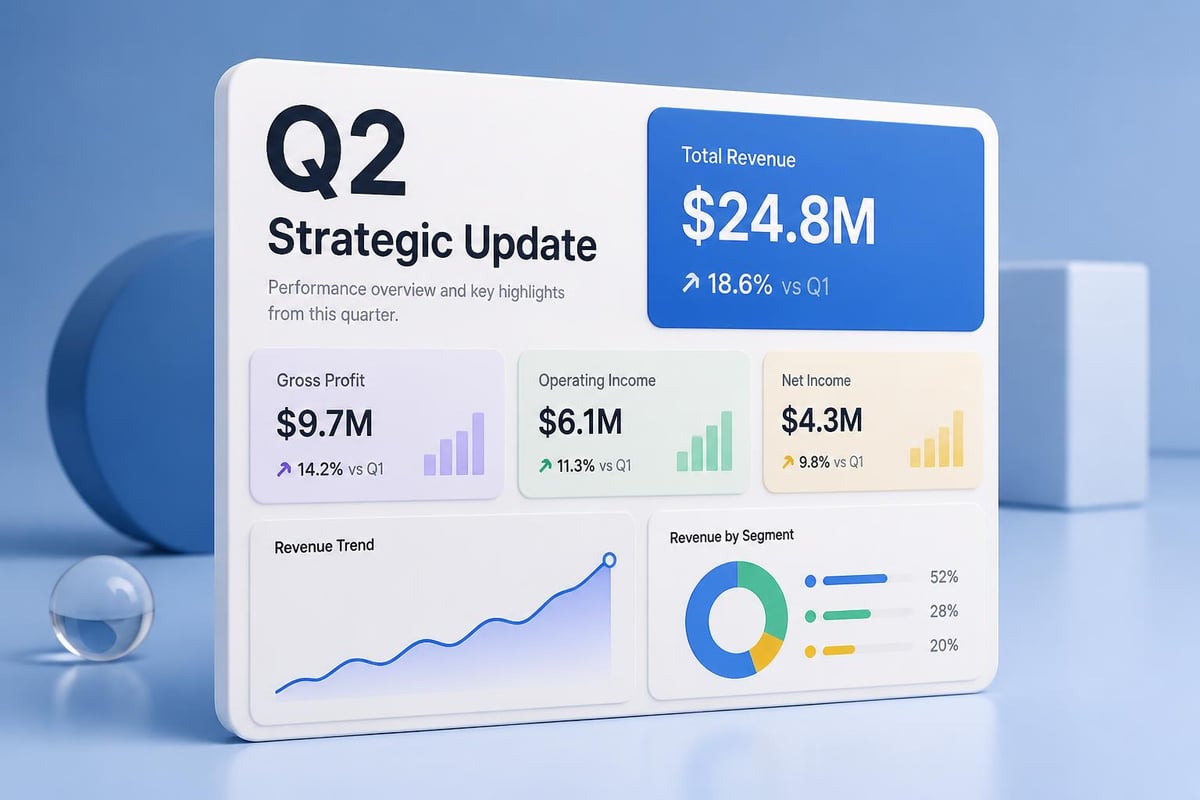
Chart Selection for Maximum Impact
Not all data visualization types suit executive audiences equally well. Infographic design for executives demands chart formats that reveal insights instantly while supporting deeper analysis when required.
- Simplified bar charts: Excellent for comparing discrete values across categories
- Line graphs: Ideal for trend visualization over time periods
- Streamlined pie charts: Effective for showing composition when limited to 3-5 segments
- Heat maps: Powerful for revealing patterns across multiple dimensions
- Waterfall charts: Perfect for showing sequential changes in financial metrics
Complex visualizations like radar charts or bubble plots rarely serve executive audiences effectively, as they require interpretation time that disrupts presentation flow. When working on company presentation materials, selecting the right chart type accelerates comprehension dramatically.
Industry-Specific Considerations
Different sectors face unique challenges in infographic design for executives, requiring tailored approaches that address industry-specific communication needs and regulatory contexts.
Financial Services and Fintech
Financial executives navigate environments saturated with numerical data, regulatory requirements, and market volatility. Infographics for this audience must balance comprehensive disclosure with strategic insight extraction. The fintech and banking pitch decks space demonstrates how visual clarity can differentiate startups in crowded markets.
Financial infographic priorities:
- Regulatory compliance in visual representation
- Clear risk disclosure alongside opportunity presentation
- Historical context for performance metrics
- Transparent methodology for projections and forecasts
Technology and Cybersecurity
Tech executives require infographics that communicate complex technical concepts to diverse stakeholder groups, from technical teams to non-technical board members. This dual audience challenge defines infographic design for executives in the technology sector.
Cybersecurity presentations face particular challenges in visualizing abstract threats and demonstrating ROI on security investments. Solutions that translate technical vulnerabilities into business risk language prove most effective. The presentation outsourcing services approach enables technology companies to maintain technical accuracy while achieving executive-level clarity.
Common Pitfalls and How to Avoid Them
Even experienced designers fall into predictable traps when creating infographic design for executives. Recognizing these patterns enables proactive prevention.
Over-Animation and Visual Gimmicks
Animation serves legitimate purposes in presentations, but excessive motion distracts executive audiences from substantive content. Every animated element should answer a simple question: Does this animation clarify the message or merely entertain?
Animation guidelines for executive infographics:
- Limit animations to 2-3 per slide maximum
- Use motion to reveal information progressively, not simultaneously
- Ensure animations complete within 1-2 seconds
- Avoid looping animations that continue during discussion
The eSlide guidance on integrating infographics into PowerPoint emphasizes functionality over flash, a principle that serves executive audiences exceptionally well.
Data Overload Syndrome
The temptation to include every available data point undermines infographic design for executives more than any other single mistake. Comprehensive analysis belongs in appendices and detailed reports, not primary visual communications.

Inconsistent Visual Language
When infographic elements lack cohesive design systems, executives expend cognitive energy decoding visual vocabulary rather than absorbing insights. Consistency in iconography, color usage, and layout patterns reduces this friction dramatically.
| Consistency Element | Implementation Standard | Business Impact |
|---|---|---|
| Icon Style | Single icon family throughout presentation | Immediate recognition, reduced confusion |
| Grid System | Consistent margins and alignment | Professional appearance, easier scanning |
| Data Visualization | Uniform chart styling and labeling | Faster comparison across slides |
| Color Coding | Persistent meaning for colors | Intuitive understanding without legends |
Building Your Executive Infographic System
Organizations that excel at infographic design for executives develop systematic approaches rather than treating each presentation as a unique creative challenge. This systematization accelerates production while ensuring quality consistency.
Template Infrastructure
Establishing robust template systems enables teams to focus on content strategy rather than reinventing design approaches. Effective templates embed best practices while allowing customization for specific contexts.
Components of effective template systems:
- Master slide layouts optimized for common executive content types
- Pre-designed chart templates with appropriate styling
- Icon libraries aligned with brand standards
- Color palette configurations for different message types
- Typography hierarchies coded into style definitions
These systems prove particularly valuable for organizations producing regular executive reports, board presentations, and investor communications. The efficiency gains compound over time as teams internalize template logic.
Quality Assurance Processes
Before any executive infographic reaches its intended audience, systematic review processes catch errors and refinement opportunities. These checks ensure consistency with both design standards and strategic messaging requirements.
- Data accuracy verification: Cross-reference all metrics against source materials
- Visual hierarchy assessment: Confirm key messages emerge within 5 seconds
- Brand compliance review: Ensure alignment with corporate identity standards
- Accessibility evaluation: Test readability under various viewing conditions
- Stakeholder preview: Gather feedback from representative audience members
Adapting Infographics Across Presentation Contexts
Infographic design for executives must flex to accommodate different presentation environments while maintaining core effectiveness. The same underlying data often requires distinct visual treatments for board meetings versus investor roadshows.
Board Presentations Versus Investor Decks
Board members typically engage with materials in both pre-read documents and live presentations, allowing for slightly higher information density. Investor audiences, conversely, encounter materials primarily during pitched presentations, demanding even greater visual simplicity. Understanding when to apply specific strategies outlined in 10 infographic design tips helps tailor approaches appropriately.
Digital Versus Print Optimization
Screen presentations and printed materials require different technical specifications despite similar design principles. Resolution requirements, color space considerations, and sizing parameters all shift between media.
Media-specific optimization factors:
| Consideration | Digital Presentation | Print Materials |
|---|---|---|
| Resolution | 150 PPI minimum | 300 PPI required |
| Color Space | RGB for screens | CMYK for printing |
| Font Sizing | Larger for distance viewing | Can be more compact |
| File Format | PowerPoint, PDF, Keynote | High-resolution PDF |
Mobile and Tablet Accessibility
Executive audiences increasingly review presentations on mobile devices during travel or between meetings. Infographic design for executives must account for these smaller screen contexts without creating separate deliverables for every platform.
Responsive design principles adapted from web development inform mobile-friendly executive infographics. Critical information must remain legible on screens as small as 7 inches diagonally, while maintaining visual impact when projected on large conference room displays.
Measuring Infographic Effectiveness
Sophisticated organizations treat infographic design for executives as a measurable communication channel rather than purely creative output. Quantifying effectiveness enables continuous improvement and demonstrates design ROI.
Engagement Metrics
During live presentations, observable audience behaviors signal infographic effectiveness. Presenters can track questions asked, discussion topics generated, and time spent on specific slides.
Observable effectiveness indicators:
- Reduced clarifying questions during presentation delivery
- Spontaneous strategic discussions triggered by visual insights
- Requests for additional detail on specific metrics
- Follow-up questions that build on presented information rather than seeking basic clarification
Comprehension Assessment
Post-presentation surveys and informal feedback sessions reveal whether executives extracted intended insights from infographic content. These assessments identify specific design elements that facilitated or hindered understanding.
Decision Impact Tracking
The ultimate measure of infographic design for executives lies in downstream decision quality and velocity. Did the visual presentation enable faster consensus? Did it surface risks that might otherwise have been overlooked? Tracking these outcomes connects design quality to business results. The principles from SlideGenius on effective infographic design emphasize this connection between visual clarity and business outcomes.
Advanced Techniques for Specialized Scenarios
Certain executive communication contexts demand specialized approaches within infographic design for executives. Mastering these advanced techniques separates competent designers from exceptional strategic communicators.
Comparative Analysis Frameworks
When executives evaluate multiple strategic options, infographic design must facilitate direct comparison without introducing bias. Parallel visual structures enable side-by-side assessment while maintaining neutrality.
- Consistent evaluation criteria: Apply identical metrics across all options
- Balanced visual emphasis: Avoid privileging any option through design choices
- Clear trade-off visualization: Highlight strengths and weaknesses transparently
- Scenario modeling: Show outcomes under different assumption sets
Trend Analysis Over Time
Executive decision-making relies heavily on understanding directional momentum and inflection points. Time-series infographics must balance historical context with forward-looking projections.
Temporal visualization best practices:
- Clearly distinguish historical data from projections
- Highlight inflection points and trend changes
- Include relevant external context markers
- Show confidence intervals for forecasted periods
Geographic and Market Segmentation
Global organizations require infographics that communicate performance variations across regions, markets, or customer segments. These visualizations must avoid overwhelming executives while providing necessary granularity. The approaches used in biotech pitch deck insights demonstrate how complex scientific and market data can be structured for executive comprehension.
Integration with Broader Communication Strategies
Infographic design for executives exists within larger organizational communication ecosystems. The most effective approaches align visual design standards with verbal messaging frameworks and written communication styles.
Consistency Across Touchpoints
Executives encounter organizational messages through multiple channels: presentations, reports, email updates, and dashboard systems. Visual consistency across these touchpoints reinforces messaging while building cumulative comprehension.
Supporting Narrative Development
The best infographics don't stand alone-they support and enhance verbal narratives delivered during presentations. Design choices should complement speaking points rather than competing for attention or introducing contradictory information.
Building Institutional Knowledge
As organizations develop sophisticated infographic design for executives capabilities, they create institutional knowledge assets. Documented design systems, template libraries, and best practice guides enable new team members to maintain quality standards while reducing training time.
Mastering infographic design for executives transforms how organizations communicate strategic information, enabling faster decisions backed by clearer understanding. The principles of hierarchy, clarity, and purposeful design create visual communications that respect executive time constraints while delivering comprehensive insights. Whether you're preparing board presentations, investor decks, or strategic updates, Prznt Perfect brings specialized expertise in transforming complex financial and technical data into compelling executive narratives. Our team understands the unique demands of C-suite audiences and delivers infographic solutions that drive business outcomes.



- This is some text inside of a div block.lay out the facts clearly and compellingly. Use data to establish the ground reality, but remember that facts alone are like the individual strands of a tapestry—necessary but not complete.lay out the facts clearly and compellingly. Use data to establish the ground reality, but remember that facts alone are like the individual strands of a tapestry—necessary but not complete.
- This is some text inside of a div block.lay out the facts clearly and compellingly. Use data to establish the ground reality, but remember that facts alone are like the individual strands of a tapestry—necessary but not complete.

.png)
