Business PPT: Elevate Your Corporate Presentations

Creating an effective business ppt requires more than just inserting data onto slides and calling it a day. In today's competitive corporate environment, presentations serve as critical communication tools that can make or break deals, secure funding, and establish thought leadership. For financial and tech companies especially, the ability to transform complex information into digestible, engaging visual narratives separates industry leaders from the rest. A well-crafted business ppt demonstrates professionalism, clarifies complicated concepts, and guides audiences toward specific actions or decisions. Understanding the fundamental principles of presentation design empowers organizations to communicate with precision and impact.

Strategic Planning for Business Presentations

Before opening PowerPoint, successful presenters invest significant time in strategic planning. This preparatory phase determines the entire trajectory of your business ppt and ensures every slide serves a specific purpose.

Defining Clear Objectives

Every business ppt should begin with a clearly defined objective. Ask yourself what you want your audience to think, feel, or do after viewing your presentation. Specific goals might include securing investment approval, explaining a new product feature, training team members on processes, or convincing stakeholders to adopt a strategic initiative.

The objective shapes everything that follows:

  • Content selection: Only include information that supports your goal
  • Narrative structure: Organize your story to build toward the desired outcome
  • Call to action: End with specific next steps aligned with your objective
  • Metrics for success: Determine how you'll measure presentation effectiveness

Once you establish your objective, developing effective business presentations becomes significantly easier because you have a clear filter for decision-making.

Audience Analysis and Customization

Understanding your audience determines how you package and deliver information. A business ppt designed for C-suite executives differs dramatically from one created for technical teams or external clients. Financial professionals expect detailed data and ROI calculations, while creative teams might respond better to visual metaphors and innovative design approaches.

Consider these audience factors:

  1. Technical expertise: How familiar are they with industry terminology?
  2. Decision-making authority: Can they approve your proposal immediately?
  3. Time constraints: How much detail can you realistically cover?
  4. Preferred communication styles: Do they value data, stories, or visual evidence?
  5. Existing knowledge: What context do you need to establish?
Audience analysis framework

Design Principles That Drive Engagement

Visual design isn't merely aesthetic-it directly impacts comprehension and retention. Research consistently shows that audiences remember well-designed content significantly better than text-heavy slides.

Visual Hierarchy and Information Architecture

Effective business ppt design guides the viewer's eye through information in a logical sequence. Visual hierarchy uses size, color, contrast, and positioning to indicate importance and relationships between elements.

Design Element Purpose Best Practice
Headline Size Establish primary message 30-44pt for main titles
Body Text Provide supporting details 18-24pt for readability
White Space Reduce cognitive load Use 30-40% of slide area
Color Contrast Direct attention Maintain 4.5:1 ratio minimum

Professional PowerPoint design services understand that every design choice should enhance clarity rather than add decoration. When creating your business ppt, limit each slide to one main idea and use visual elements to reinforce that concept rather than distract from it.

Typography and Readability

Font selection significantly impacts how audiences perceive your business ppt. Sans-serif fonts like Helvetica, Arial, or Calibri provide excellent readability for digital presentations, while serif fonts can work well for printed materials.

Typography guidelines for business presentations:

  • Limit font families: Use maximum two fonts throughout
  • Maintain consistency: Apply the same styles for similar content types
  • Ensure legibility: Test slides from the back of the room
  • Avoid decorative fonts: Stick with professional, clean typefaces
  • Consider font weight: Use bold sparingly for emphasis only

The Microsoft guide on formatting presentation slides offers additional technical specifications for optimizing slide readability across different viewing contexts.

Content Strategy for Maximum Impact

Beyond visual design, the actual content within your business ppt determines whether audiences understand and act on your message. Strategic content development requires careful editing and purposeful storytelling.

The Power of Data Visualization

Financial and tech companies often struggle with presenting complex datasets effectively. Raw numbers in spreadsheet format overwhelm audiences and obscure insights. Transforming data into charts, graphs, and infographics makes information accessible and memorable.

Effective data visualization techniques include:

  • Bar charts for comparing quantities across categories
  • Line graphs for showing trends over time
  • Pie charts for illustrating proportional relationships (use sparingly)
  • Heat maps for displaying patterns across multiple variables
  • Icon arrays for representing percentages visually

When incorporating data into your business ppt, always provide context. A number alone means nothing-audiences need benchmarks, comparisons, and explanations to understand significance. For specialized presentations like those for fintech companies, data visualization becomes especially critical for communicating financial performance and market opportunities.

Platforms like RankPill demonstrate how automated systems can help businesses maintain consistent content output, and similarly, establishing templates and standards for data presentation ensures consistency across all your business presentations.

Storytelling Frameworks

Even the most data-driven business ppt benefits from narrative structure. Stories create emotional connections and help audiences remember key points long after the presentation ends.

Classic storytelling frameworks adapted for business contexts:

  1. Problem-Solution-Benefit: Identify a challenge, present your solution, demonstrate results
  2. Before-After-Bridge: Show current state, describe ideal future, explain how to get there
  3. Hero's Journey: Position your client/audience as the hero overcoming obstacles
  4. Feature-Advantage-Benefit: Explain what you offer, why it matters, how it helps

Reviewing business presentation examples reveals how successful companies structure narratives to guide audiences through complex information toward specific conclusions.

Technical Execution and Delivery Preparation

Creating slides represents only half the challenge. Delivering your business ppt with confidence and polish requires thorough preparation and technical competence.

Mastering Presentation Software Features

Modern presentation platforms offer sophisticated features that many users never explore. Understanding advanced capabilities enables you to create more dynamic, interactive business ppt experiences.

Underutilized PowerPoint features:

  • Slide master templates: Establish consistent formatting across all slides
  • Custom animations: Direct attention without overwhelming audiences
  • Hyperlinked navigation: Create non-linear presentation flows
  • Embedded multimedia: Integrate videos and audio seamlessly
  • Presenter view: Access notes and timers invisible to audiences

For those seeking professional PowerPoint solutions, understanding these technical capabilities helps you communicate requirements clearly to designers and developers.

Presentation delivery preparation

Rehearsal and Refinement

No business ppt succeeds without adequate rehearsal. Practice reveals timing issues, awkward transitions, and content gaps that aren't apparent during creation. Professional presenters typically rehearse at least three times before important presentations.

Rehearsal Stage Focus Area Outcome
First Run Content familiarity Smooth narrative flow
Second Run Timing and pacing Fit within time constraints
Third Run Polish and refinement Natural, confident delivery

Record yourself presenting to identify verbal tics, filler words, and body language issues. Solicit feedback from colleagues who understand your audience and objectives. Each iteration improves both your slides and your delivery.

Industry-Specific Considerations

Different industries require distinct approaches to business ppt development. Financial services demand precision and regulatory compliance, while technology companies emphasize innovation and scalability.

Financial Sector Presentations

Financial institutions face unique challenges when creating business presentations. Regulatory requirements, data security concerns, and sophisticated audiences demand exceptional attention to detail. Your business ppt must balance comprehensive information with digestible formatting.

Critical elements for financial presentations:

  • Compliance disclaimers and risk disclosures
  • Audited financial statements and performance metrics
  • Market analysis and competitive positioning
  • Clear explanations of complex financial instruments
  • Conservative design that conveys trustworthiness

Specialized agencies understand these nuances and create pitch decks that resonate specifically with investor audiences and financial stakeholders.

Technology Company Requirements

Tech businesses require presentations that communicate innovation while remaining accessible to non-technical stakeholders. Your business ppt might need to explain complex algorithms to investors or demonstrate product functionality to potential customers.

Technology presentation best practices include:

  • Product demonstrations: Show rather than tell whenever possible
  • Scalability metrics: Illustrate growth potential with concrete numbers
  • Technical architecture: Simplify complex systems without oversimplifying
  • Competitive advantages: Clearly differentiate your solution
  • Roadmap visualization: Present future development plans clearly

Organizations leveraging SEO strategies from experts understand the importance of clear communication, and these same principles apply to presentation content development.

Optimizing for Different Presentation Contexts

The context in which you deliver your business ppt dramatically affects design and content decisions. A boardroom presentation differs from a conference keynote, which differs from a webinar.

In-Person Presentations

Face-to-face presentations allow for real-time interaction and immediate feedback. Design your business ppt to complement rather than replace your spoken words.

In-person presentation optimization:

  • Use larger fonts readable from 20+ feet away
  • Minimize text to avoid audiences reading instead of listening
  • Incorporate pauses for questions and discussion
  • Prepare backup slides for anticipated questions
  • Test equipment and lighting beforehand

Virtual and Hybrid Formats

Remote presentations present distinct challenges including screen size limitations, connectivity issues, and reduced audience engagement. Your business ppt needs to work harder to maintain attention across digital channels.

Virtual presentation adaptations:

  1. Increase visual interest: More graphics, less text
  2. Shorter segments: Break content into 5-10 minute modules
  3. Interactive elements: Polls, Q&A, and chat engagement
  4. Clear audio quality: Invest in professional microphones
  5. Lighting setup: Ensure presenters are well-lit and visible

Understanding essential elements to include in presentations helps you adapt core principles across different delivery formats.

Presentation format adaptation

Measuring Presentation Effectiveness

Creating a business ppt represents an investment of time and resources. Measuring effectiveness ensures continuous improvement and demonstrates ROI.

Quantitative Metrics

Establish concrete metrics before presenting to evaluate success objectively.

Measurable presentation outcomes:

  • Conversion rates for sales presentations
  • Funding secured from investor pitches
  • Project approvals from executive committees
  • Training completion and comprehension scores
  • Audience engagement analytics (for virtual presentations)

Track these metrics over time to identify patterns and optimize future presentations. A/B testing different approaches reveals what resonates most effectively with your specific audiences.

Qualitative Feedback

Numbers don't tell the complete story. Qualitative feedback provides context and insights that pure data misses.

Gather qualitative input through:

  • Post-presentation surveys with open-ended questions
  • One-on-one interviews with key stakeholders
  • Observation of audience reactions during delivery
  • Follow-up conversations about specific content
  • Peer review from presentation design professionals

Advanced Techniques for Visual Storytelling

Sophisticated business ppt design employs advanced techniques that transform good presentations into exceptional ones. These approaches require additional skill but deliver proportionally greater impact.

Animation and Transition Strategy

When used strategically, animations guide audience attention and reveal information progressively. However, excessive animation distracts and appears unprofessional.

Animation Type Appropriate Use Avoid
Fade in Revealing bullet points sequentially Random objects appearing
Morph Smooth transitions between slides Complex object transformations
Zoom Focusing on specific data points Dizzying camera movements
Wipe Directional information flow Inconsistent directions

Animation should feel invisible-audiences should process information without noticing the technical mechanism delivering it.

Color Psychology and Brand Alignment

Color choices in your business ppt communicate subconscious messages and reinforce brand identity. Financial presentations often employ blue tones conveying trust and stability, while technology companies might use vibrant colors suggesting innovation.

Color strategy considerations:

  • Maintain accessibility with sufficient contrast ratios
  • Limit color palette to 3-4 primary colors
  • Use color consistently to indicate information types
  • Align with existing brand guidelines
  • Consider cultural associations for international audiences

Professional resources like PowerPoint presentation tips offer comprehensive guidance on implementing color theory effectively.

Template Development and Brand Consistency

Organizations creating frequent presentations benefit enormously from developing standardized templates. A well-designed template ensures brand consistency while accelerating production timelines.

Building Effective Templates

Quality templates balance flexibility with consistency. They provide enough structure to maintain professional standards while allowing customization for specific contexts.

Template components should include:

  1. Master slides: Establish layouts for different content types
  2. Color schemes: Define primary and accent colors
  3. Typography rules: Specify fonts, sizes, and formatting
  4. Image guidelines: Set standards for photography and graphics
  5. Logo placement: Consistent brand positioning

Exploring professional presentation examples demonstrates how effective templates maintain cohesion across diverse presentation topics.

Maintaining Template Libraries

As organizations grow, template libraries become critical assets. Organize templates by presentation type, audience, or department to ensure teams access appropriate starting points.

Template library best practices:

  • Version control to track updates and improvements
  • Access permissions ensuring appropriate usage
  • Regular audits to remove outdated templates
  • Documentation explaining when to use each template
  • Training programs for new team members

Accessibility and Inclusive Design

Creating accessible business ppt presentations ensures all audience members can engage with your content regardless of abilities or circumstances.

Universal Design Principles

Accessible design benefits everyone, not just those with specific needs. Clear hierarchy, readable fonts, and logical organization improve comprehension for all audiences.

Accessibility checklist for business presentations:

  • Alt text: Describe all images for screen readers
  • Color blindness: Don't rely solely on color to convey meaning
  • Contrast ratios: Ensure text remains readable
  • Reading order: Structure slides logically for assistive technology
  • Captions: Include subtitles for video content

Implementing these standards demonstrates professionalism and social responsibility while expanding your potential audience.


Mastering business ppt development requires balancing strategic thinking, design expertise, and technical execution. By implementing these proven principles-from audience analysis and visual hierarchy to accessibility and measurement-you create presentations that inform, persuade, and inspire action. Whether you're preparing a quarterly review, investor pitch, or product launch, applying professional design standards elevates your message and strengthens your competitive position. Prznt Perfect specializes in transforming complex business narratives into visually compelling presentations that resonate with financial and tech audiences, helping you communicate with clarity and confidence when it matters most.

We offer free 30-min consultation on the presentation design audit
and hiring the right visual 
comms professional, let’s talk!
Shedule a call
Shedule a call
"I understand" goes a step further into the cognitive dance of persuasion. It's where the audience begins to see the connections between the facts, to grasp the nuances of the problem and the elegance of the solution.
  • This is some text inside of a div block.
    lay out the facts clearly and compellingly. Use data to establish the ground reality, but remember that facts alone are like the individual strands of a tapestry—necessary but not complete.
    lay out the facts clearly and compellingly. Use data to establish the ground reality, but remember that facts alone are like the individual strands of a tapestry—necessary but not complete.
  • This is some text inside of a div block.
    lay out the facts clearly and compellingly. Use data to establish the ground reality, but remember that facts alone are like the individual strands of a tapestry—necessary but not complete.

We offer free 30-min consultation on the presentation design audit

and hiring the right visual 
comms professional, let’s talk!

Shedule a call

"I understand" goes a step further into the cognitive dance of persuasion. It's where the audience begins to see the connections between the facts, to grasp the nuances of the problem and the elegance of the solution.

  • - 1 -
    Consistency at Scale:

    Biotech Market Trends 2024: Tailoring Your Pitch Deck to Current Industry Dynamics.

  • - 2 -
    Efficiency and Speed:

    The traditional process of manually updating presentations is not only slow but also prone to bottlenecks, especially when dealing with large volumes of slides. Automation dramatically accelerates this process, enabling designers to apply changes across hundreds of slides in the time it would take to manually update a single one. This efficiency is a game-changer for agencies working under tight deadlines or managing multiple projects simultaneously.

  • - 3 -
    Enhanced Creativity:

    With the burden of manual updates lifted, designers can allocate more time and energy to the creative aspects of presentation design. This freedom allows for deeper exploration of innovative design concepts, experimentation with new visual storytelling techniques, and the development of more engaging and interactive presentations. Automation doesn't stifle creativity; it amplifies it, enabling designers to push the boundaries of what's possible in corporate presentation design.

  • - 4 -
    Error Reduction:

    Manual updates are inherently prone to inconsistencies and mistakes, from misaligned logos to incorrect font sizes. These errors can detract from the professionalism of a presentation and, by extension, the corporate image. Automation minimizes these risks by ensuring that updates are applied uniformly and accurately across all slides, enhancing the overall quality and integrity of the presentation.

  • - 5 -
    Cost-Effectiveness:

    The time savings afforded by automation directly translate to cost savings for both the design agency and its clients. By reducing the hours spent on manual updates, agencies can optimize their workflows and resources, allowing them to take on more projects without compromising on quality. This efficiency can also make high-quality presentation design services more affordable and accessible to a broader range of businesses.

Business PPT: Elevate Your Corporate Presentations

Discover expert strategies for creating compelling business PPT presentations that engage audiences and drive results for financial and tech companies.

Creating an effective business ppt requires more than just inserting data onto slides and calling it a day. In today's competitive corporate environment, presentations serve as critical communication tools that can make or break deals, secure funding, and establish thought leadership. For financial and tech companies especially, the ability to transform complex information into digestible, engaging visual narratives separates industry leaders from the rest. A well-crafted business ppt demonstrates professionalism, clarifies complicated concepts, and guides audiences toward specific actions or decisions. Understanding the fundamental principles of presentation design empowers organizations to communicate with precision and impact.

Strategic Planning for Business Presentations

Before opening PowerPoint, successful presenters invest significant time in strategic planning. This preparatory phase determines the entire trajectory of your business ppt and ensures every slide serves a specific purpose.

Defining Clear Objectives

Every business ppt should begin with a clearly defined objective. Ask yourself what you want your audience to think, feel, or do after viewing your presentation. Specific goals might include securing investment approval, explaining a new product feature, training team members on processes, or convincing stakeholders to adopt a strategic initiative.

The objective shapes everything that follows:

  • Content selection: Only include information that supports your goal
  • Narrative structure: Organize your story to build toward the desired outcome
  • Call to action: End with specific next steps aligned with your objective
  • Metrics for success: Determine how you'll measure presentation effectiveness

Once you establish your objective, developing effective business presentations becomes significantly easier because you have a clear filter for decision-making.

Audience Analysis and Customization

Understanding your audience determines how you package and deliver information. A business ppt designed for C-suite executives differs dramatically from one created for technical teams or external clients. Financial professionals expect detailed data and ROI calculations, while creative teams might respond better to visual metaphors and innovative design approaches.

Consider these audience factors:

  1. Technical expertise: How familiar are they with industry terminology?
  2. Decision-making authority: Can they approve your proposal immediately?
  3. Time constraints: How much detail can you realistically cover?
  4. Preferred communication styles: Do they value data, stories, or visual evidence?
  5. Existing knowledge: What context do you need to establish?

Audience analysis framework

Design Principles That Drive Engagement

Visual design isn't merely aesthetic-it directly impacts comprehension and retention. Research consistently shows that audiences remember well-designed content significantly better than text-heavy slides.

Visual Hierarchy and Information Architecture

Effective business ppt design guides the viewer's eye through information in a logical sequence. Visual hierarchy uses size, color, contrast, and positioning to indicate importance and relationships between elements.

Design Element Purpose Best Practice
Headline Size Establish primary message 30-44pt for main titles
Body Text Provide supporting details 18-24pt for readability
White Space Reduce cognitive load Use 30-40% of slide area
Color Contrast Direct attention Maintain 4.5:1 ratio minimum

Professional PowerPoint design services understand that every design choice should enhance clarity rather than add decoration. When creating your business ppt, limit each slide to one main idea and use visual elements to reinforce that concept rather than distract from it.

Typography and Readability

Font selection significantly impacts how audiences perceive your business ppt. Sans-serif fonts like Helvetica, Arial, or Calibri provide excellent readability for digital presentations, while serif fonts can work well for printed materials.

Typography guidelines for business presentations:

  • Limit font families: Use maximum two fonts throughout
  • Maintain consistency: Apply the same styles for similar content types
  • Ensure legibility: Test slides from the back of the room
  • Avoid decorative fonts: Stick with professional, clean typefaces
  • Consider font weight: Use bold sparingly for emphasis only

The Microsoft guide on formatting presentation slides offers additional technical specifications for optimizing slide readability across different viewing contexts.

Content Strategy for Maximum Impact

Beyond visual design, the actual content within your business ppt determines whether audiences understand and act on your message. Strategic content development requires careful editing and purposeful storytelling.

The Power of Data Visualization

Financial and tech companies often struggle with presenting complex datasets effectively. Raw numbers in spreadsheet format overwhelm audiences and obscure insights. Transforming data into charts, graphs, and infographics makes information accessible and memorable.

Effective data visualization techniques include:

  • Bar charts for comparing quantities across categories
  • Line graphs for showing trends over time
  • Pie charts for illustrating proportional relationships (use sparingly)
  • Heat maps for displaying patterns across multiple variables
  • Icon arrays for representing percentages visually

When incorporating data into your business ppt, always provide context. A number alone means nothing-audiences need benchmarks, comparisons, and explanations to understand significance. For specialized presentations like those for fintech companies, data visualization becomes especially critical for communicating financial performance and market opportunities.

Platforms like RankPill demonstrate how automated systems can help businesses maintain consistent content output, and similarly, establishing templates and standards for data presentation ensures consistency across all your business presentations.

Storytelling Frameworks

Even the most data-driven business ppt benefits from narrative structure. Stories create emotional connections and help audiences remember key points long after the presentation ends.

Classic storytelling frameworks adapted for business contexts:

  1. Problem-Solution-Benefit: Identify a challenge, present your solution, demonstrate results
  2. Before-After-Bridge: Show current state, describe ideal future, explain how to get there
  3. Hero's Journey: Position your client/audience as the hero overcoming obstacles
  4. Feature-Advantage-Benefit: Explain what you offer, why it matters, how it helps

Reviewing business presentation examples reveals how successful companies structure narratives to guide audiences through complex information toward specific conclusions.

Technical Execution and Delivery Preparation

Creating slides represents only half the challenge. Delivering your business ppt with confidence and polish requires thorough preparation and technical competence.

Mastering Presentation Software Features

Modern presentation platforms offer sophisticated features that many users never explore. Understanding advanced capabilities enables you to create more dynamic, interactive business ppt experiences.

Underutilized PowerPoint features:

  • Slide master templates: Establish consistent formatting across all slides
  • Custom animations: Direct attention without overwhelming audiences
  • Hyperlinked navigation: Create non-linear presentation flows
  • Embedded multimedia: Integrate videos and audio seamlessly
  • Presenter view: Access notes and timers invisible to audiences

For those seeking professional PowerPoint solutions, understanding these technical capabilities helps you communicate requirements clearly to designers and developers.

Presentation delivery preparation

Rehearsal and Refinement

No business ppt succeeds without adequate rehearsal. Practice reveals timing issues, awkward transitions, and content gaps that aren't apparent during creation. Professional presenters typically rehearse at least three times before important presentations.

Rehearsal Stage Focus Area Outcome
First Run Content familiarity Smooth narrative flow
Second Run Timing and pacing Fit within time constraints
Third Run Polish and refinement Natural, confident delivery

Record yourself presenting to identify verbal tics, filler words, and body language issues. Solicit feedback from colleagues who understand your audience and objectives. Each iteration improves both your slides and your delivery.

Industry-Specific Considerations

Different industries require distinct approaches to business ppt development. Financial services demand precision and regulatory compliance, while technology companies emphasize innovation and scalability.

Financial Sector Presentations

Financial institutions face unique challenges when creating business presentations. Regulatory requirements, data security concerns, and sophisticated audiences demand exceptional attention to detail. Your business ppt must balance comprehensive information with digestible formatting.

Critical elements for financial presentations:

  • Compliance disclaimers and risk disclosures
  • Audited financial statements and performance metrics
  • Market analysis and competitive positioning
  • Clear explanations of complex financial instruments
  • Conservative design that conveys trustworthiness

Specialized agencies understand these nuances and create pitch decks that resonate specifically with investor audiences and financial stakeholders.

Technology Company Requirements

Tech businesses require presentations that communicate innovation while remaining accessible to non-technical stakeholders. Your business ppt might need to explain complex algorithms to investors or demonstrate product functionality to potential customers.

Technology presentation best practices include:

  • Product demonstrations: Show rather than tell whenever possible
  • Scalability metrics: Illustrate growth potential with concrete numbers
  • Technical architecture: Simplify complex systems without oversimplifying
  • Competitive advantages: Clearly differentiate your solution
  • Roadmap visualization: Present future development plans clearly

Organizations leveraging SEO strategies from experts understand the importance of clear communication, and these same principles apply to presentation content development.

Optimizing for Different Presentation Contexts

The context in which you deliver your business ppt dramatically affects design and content decisions. A boardroom presentation differs from a conference keynote, which differs from a webinar.

In-Person Presentations

Face-to-face presentations allow for real-time interaction and immediate feedback. Design your business ppt to complement rather than replace your spoken words.

In-person presentation optimization:

  • Use larger fonts readable from 20+ feet away
  • Minimize text to avoid audiences reading instead of listening
  • Incorporate pauses for questions and discussion
  • Prepare backup slides for anticipated questions
  • Test equipment and lighting beforehand

Virtual and Hybrid Formats

Remote presentations present distinct challenges including screen size limitations, connectivity issues, and reduced audience engagement. Your business ppt needs to work harder to maintain attention across digital channels.

Virtual presentation adaptations:

  1. Increase visual interest: More graphics, less text
  2. Shorter segments: Break content into 5-10 minute modules
  3. Interactive elements: Polls, Q&A, and chat engagement
  4. Clear audio quality: Invest in professional microphones
  5. Lighting setup: Ensure presenters are well-lit and visible

Understanding essential elements to include in presentations helps you adapt core principles across different delivery formats.
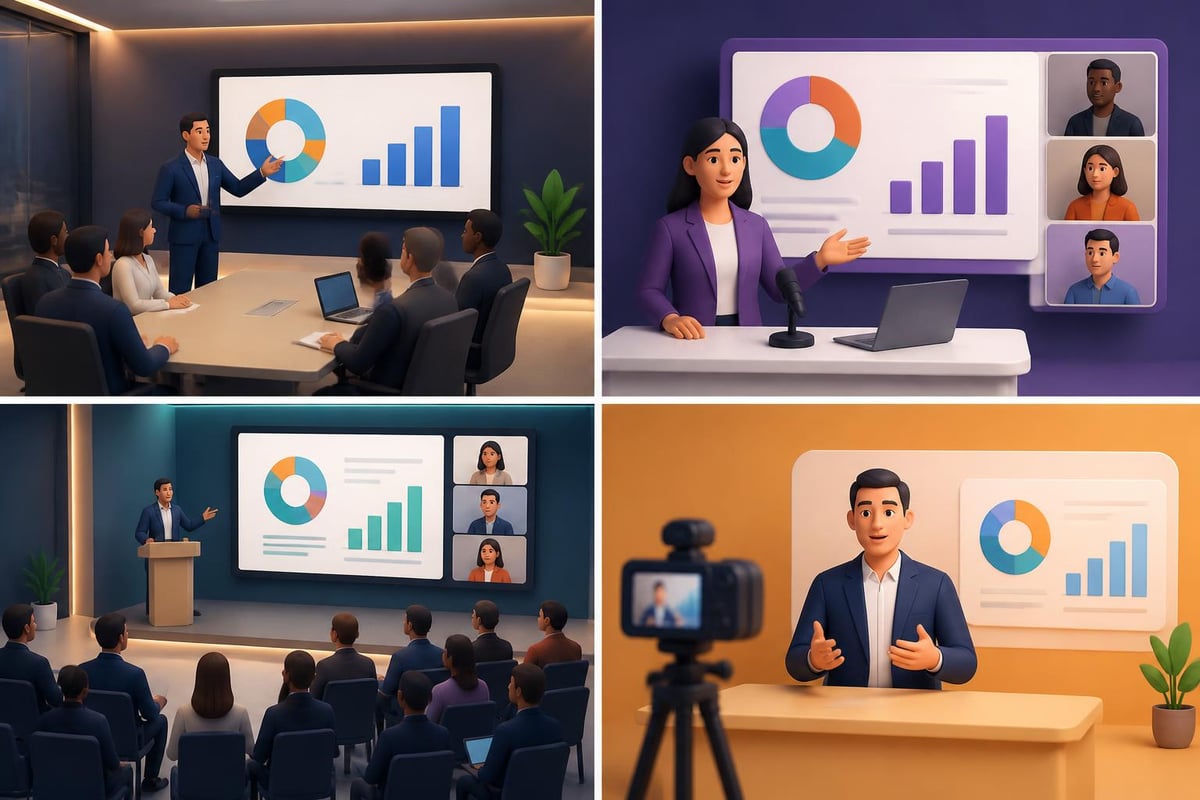
Presentation format adaptation

Measuring Presentation Effectiveness

Creating a business ppt represents an investment of time and resources. Measuring effectiveness ensures continuous improvement and demonstrates ROI.

Quantitative Metrics

Establish concrete metrics before presenting to evaluate success objectively.

Measurable presentation outcomes:

  • Conversion rates for sales presentations
  • Funding secured from investor pitches
  • Project approvals from executive committees
  • Training completion and comprehension scores
  • Audience engagement analytics (for virtual presentations)

Track these metrics over time to identify patterns and optimize future presentations. A/B testing different approaches reveals what resonates most effectively with your specific audiences.

Qualitative Feedback

Numbers don't tell the complete story. Qualitative feedback provides context and insights that pure data misses.

Gather qualitative input through:

  • Post-presentation surveys with open-ended questions
  • One-on-one interviews with key stakeholders
  • Observation of audience reactions during delivery
  • Follow-up conversations about specific content
  • Peer review from presentation design professionals

Advanced Techniques for Visual Storytelling

Sophisticated business ppt design employs advanced techniques that transform good presentations into exceptional ones. These approaches require additional skill but deliver proportionally greater impact.

Animation and Transition Strategy

When used strategically, animations guide audience attention and reveal information progressively. However, excessive animation distracts and appears unprofessional.

Animation Type Appropriate Use Avoid
Fade in Revealing bullet points sequentially Random objects appearing
Morph Smooth transitions between slides Complex object transformations
Zoom Focusing on specific data points Dizzying camera movements
Wipe Directional information flow Inconsistent directions

Animation should feel invisible-audiences should process information without noticing the technical mechanism delivering it.

Color Psychology and Brand Alignment

Color choices in your business ppt communicate subconscious messages and reinforce brand identity. Financial presentations often employ blue tones conveying trust and stability, while technology companies might use vibrant colors suggesting innovation.

Color strategy considerations:

  • Maintain accessibility with sufficient contrast ratios
  • Limit color palette to 3-4 primary colors
  • Use color consistently to indicate information types
  • Align with existing brand guidelines
  • Consider cultural associations for international audiences

Professional resources like PowerPoint presentation tips offer comprehensive guidance on implementing color theory effectively.

Template Development and Brand Consistency

Organizations creating frequent presentations benefit enormously from developing standardized templates. A well-designed template ensures brand consistency while accelerating production timelines.

Building Effective Templates

Quality templates balance flexibility with consistency. They provide enough structure to maintain professional standards while allowing customization for specific contexts.

Template components should include:

  1. Master slides: Establish layouts for different content types
  2. Color schemes: Define primary and accent colors
  3. Typography rules: Specify fonts, sizes, and formatting
  4. Image guidelines: Set standards for photography and graphics
  5. Logo placement: Consistent brand positioning

Exploring professional presentation examples demonstrates how effective templates maintain cohesion across diverse presentation topics.

Maintaining Template Libraries

As organizations grow, template libraries become critical assets. Organize templates by presentation type, audience, or department to ensure teams access appropriate starting points.

Template library best practices:

  • Version control to track updates and improvements
  • Access permissions ensuring appropriate usage
  • Regular audits to remove outdated templates
  • Documentation explaining when to use each template
  • Training programs for new team members

Accessibility and Inclusive Design

Creating accessible business ppt presentations ensures all audience members can engage with your content regardless of abilities or circumstances.

Universal Design Principles

Accessible design benefits everyone, not just those with specific needs. Clear hierarchy, readable fonts, and logical organization improve comprehension for all audiences.

Accessibility checklist for business presentations:

  • Alt text: Describe all images for screen readers
  • Color blindness: Don't rely solely on color to convey meaning
  • Contrast ratios: Ensure text remains readable
  • Reading order: Structure slides logically for assistive technology
  • Captions: Include subtitles for video content

Implementing these standards demonstrates professionalism and social responsibility while expanding your potential audience.


Mastering business ppt development requires balancing strategic thinking, design expertise, and technical execution. By implementing these proven principles-from audience analysis and visual hierarchy to accessibility and measurement-you create presentations that inform, persuade, and inspire action. Whether you're preparing a quarterly review, investor pitch, or product launch, applying professional design standards elevates your message and strengthens your competitive position. Prznt Perfect specializes in transforming complex business narratives into visually compelling presentations that resonate with financial and tech audiences, helping you communicate with clarity and confidence when it matters most.

News & Updates...

Learn essential strategies for making a great PowerPoint presentation that captivates audiences and drives results in financial and tech sectors.

Master data visualisation presentation design for financial and tech businesses. Learn best practices, chart selection, and storytelling techniques.